Hermes Agent Up Close: Fifteen-Cent Tokens, Open Weights, and Who Reads Your Prompts
Research snapshot: November 21, 2026. Hermes Agent v0.23.3. Prices, rankings and star counts move weekly, so check them before you budget around them.
The most popular app on OpenRouter this month isn't a chatbot, an IDE, or anything with a billion-dollar ad campaign. It's an MIT-licensed agent from a research lab that also trains models over a network coordinated on Solana. And the brain most of its users rent isn't Claude or GPT. It's a Chinese open-weight model that costs fifteen cents per million input tokens if you call it at the right hour.
That agent is Hermes Agent from Nous Research. On OpenRouter's Hermes Agent app page, the top two models by monthly tokens are both versions of DeepSeek V4.1 Flash, and the Flash family accounts for roughly half of the tokens flowing through Hermes's top twenty models. That's not an official default. Nobody at Nous declared it. The community simply voted with its credit cards, and it probably voted on price more than anything else.
So this post tries to answer the questions I keep getting about it. What is Hermes, really? How does it compare with the polished hosted agents from Anthropic, Meta and OpenAI? Can you run it on your own hardware (probably not the way you hope)? Is fifteen-cent DeepSeek safe to use, and where do your prompts actually go? Can it replace Claude Code? And how does a lab that gives all of this away for free pay its bills?
My read
Hermes isn't a better chatbot. It's a different deal. Duet, Muse and dots rent you a concierge who works in the vendor's building. Hermes hands you the keys to your own assistant and lets you pick which brain it rents. That freedom is real, and so is the bill for it, which you'll most likely pay in operations work, security decisions and privacy homework instead of subscription fees.
What Hermes Agent actually is
Here's the mental model I'd start with. Hosted agents like Claude Duet are a hotel concierge. They're good, they're polished, they work out of the hotel's office, and they follow the hotel's rules. Hermes is closer to hiring a personal assistant and giving them a desk in your house, where you decide which rooms they can enter, which phone they answer, and which expert they call when they need to think hard. The analogy breaks down in one important place, though. A human assistant has judgment you can trust a little, while an agent has whatever judgment the model you plugged in happens to have that day.
Mechanically, Hermes is a long-running agent process with a gateway in the middle. Every interface (the terminal, the desktop app, the browser dashboard, your editor, Telegram) is a client of the same gateway, so a conversation you start in Slack can be picked up in the desktop app later. Release v0.23.0, which Nous called "The Hearth Release" and which credits 666 contributors, made that the official design, summed up in the release notes as one gateway owning every conversation.
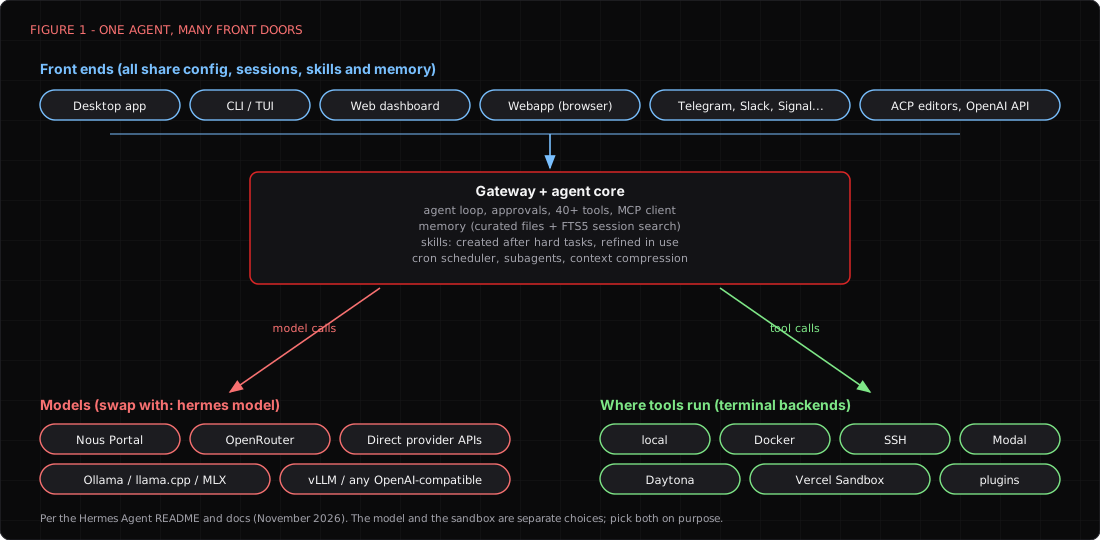
Behind that gateway sits a fairly complete agent toolkit. According to the tools documentation, there are 40-plus built-in tools covering files, the terminal, code execution, a browser, web search, vision, image generation, text to speech and scheduling. It speaks MCP, so you can bolt on any MCP server. It can spawn subagents with their own context, ten at a time by default, optionally each in its own git worktree. It has a cron scheduler that takes plain English, and it can run its tools on your laptop, in Docker, over SSH, or in hosted sandboxes like Modal, Daytona and Vercel Sandbox.
Two features make Hermes feel different from the other open agents, though.
The first is memory you can read. Hermes keeps a small curated MEMORY.md (about 2,200 characters) and USER.md (about 1,375 characters), plus a SQLite full-text index of past sessions it can search (memory docs). It's small, probably to keep every prompt lean. The agent has to decide what's worth remembering, which seems like a much nicer property than an infinite junk drawer.
The second is the skills learning loop. After a nontrivial task, Hermes can write itself a reusable skill, a markdown recipe for how it solved the problem, and patch that skill later when it works badly (skills docs). Skills follow the agentskills.io format, so they're likely portable to other agents that adopt the same standard. In plain English, the agent probably gets better at your way of working over time, though one long-term review found skills mostly helped within the same kind of task. That's the headline feature, and it's also probably the sharpest edge. An agent that writes its own standing instructions might also be tricked into writing a bad one, and a poisoned skill sticks around long after the malicious web page that planted it is gone. There's an optional skills.write_approval setting that stages skill changes for your review, and if you only change one default after reading this post, I'd probably make it that one.
The numbers suggest people like what they see. When we checked on November 21, the repository had about 265,000 stars and almost 60,000 forks, with v0.23.3 released on November 19. For a project whose v0.2.0 shipped in March, that's an absurd growth curve, and it's probably why so many agent vendors now publish "Hermes vs" comparison pages.
Hermes vs Claude Duet, Meta Muse and OpenAI dots
All three of the big hosted agents launched within about six weeks of each other this autumn, and they share a shape. Each gives the agent its own computer in the vendor's cloud, with its own browser, a large connector catalog, and an approval layer for risky actions. Each locks you to the vendor's own models. Hermes shares none of that shape, which is the whole point.
NOTE
A quick naming correction. There's no product called the "ChatGPT dots add-in." OpenAI's product is called dots, written in lowercase, and it's an agent feature inside ChatGPT rather than an add-in. OpenAI does ship a separate ChatGPT add-in for Excel, Word and PowerPoint, which has nothing to do with dots. People seem to mix them up constantly, so you're in good company.
Claude Duet is Anthropic's entry, announced on October 21 as a research preview with a waitlist. It's proactive by design. It sends a morning brief, watches the apps you connect, drafts email and Slack replies, untangles calendars, and works in the background on its own virtual machine. Per Anthropic's help page, it's available on Pro, Max and Ultra plans in the US, included at no extra cost during the preview, and it runs only on Claude Opus 5.5. You can't pick a model. It asks before it sends, pays, signs or deletes anything, and it won't trade securities. Anthropic is also candid about its limits, noting that it checks your accounts every few hours rather than continuously, that you can't watch or take over its browser, and that it can't make calls or send texts.
Meta Muse launched on September 8 in the US, then added Singapore and, according to secondary reporting, Australia. It runs Meta's Muse Spark models inside a "Secure VM," with a separate agent called Sentinel approving anything that goes out to the internet. That seems like a genuinely good architecture on paper. The free tier requires a card, paid tiers reportedly run $20 and $100 a month, and the "help improve our AI models" toggle is on by default. The field record has been bumpier. Amazon blocked Muse from its store in September, and Reuters, via BNN Bloomberg, described internal reports of bank balances showing up in unrelated chats and a non-refundable Airbnb booked without permission. Meta called them isolated incidents, which may be true, though it's hard to judge from the outside how isolated they were.
OpenAI dots were announced at DevDay on September 29. A dot is an always-on agent with its own cloud computer and browser, plugins into more than 4,000 apps, and optional access to your laptop. Custom Rules let you allow, require approval for, or block categories of action. Per OpenAI's help center, dots are available to Pro and selected Plus users, plus Business Premium and enterprise workspaces, but not in the EEA, Switzerland or the UK. They run GPT-6 Astra and GPT-6.1 Terra. Zapier's hands-on review says personal-plan training is on by default, and in Zapier's test a dot sent an email without asking first, which suggests the approval rules are only as good as the categories you remember to set.
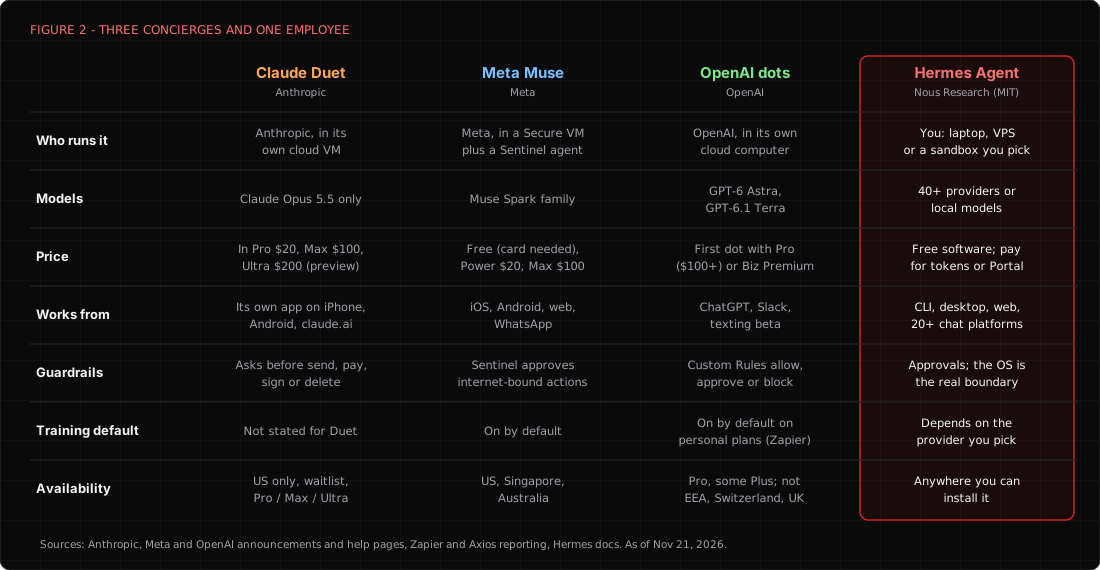
Why someone would pick Hermes over the hosted three
I think there are five honest reasons, and "it's free" is only one of them.
- Model choice. Duet is Opus 5.5, dots are GPT-6, and Muse is Muse Spark. Hermes talks to roughly forty named providers plus anything with an OpenAI-compatible endpoint, and
hermes modelswitches between them whenever you like. If a cheaper model shows up next Tuesday, you can likely use it on Tuesday. - Where it runs. Hermes runs on your laptop, a $5 VPS, or a sandbox you pick, and keeps its state in
~/.hermes. Your files, memory and skills are on disk you control. (Your prompts still go to whichever model provider you choose, which is the subject of a whole section below.) - Where you talk to it. The messaging gateway supports more than twenty platforms, and the docs table lists 28, including Telegram, Signal, Slack, Discord, Matrix, email, SMS and even IRC. Duet lives in its own app, Muse lives in Meta's apps, and dots live in ChatGPT.
- Real scheduling. Duet checks in every few hours on its own cadence. Hermes runs cron jobs you define, down to the minute, and delivers the results wherever you want.
- Cost and availability. No waitlist, no region gate, and no plan requirement. You pay for tokens, and as we'll see, tokens have gotten very cheap.
And why someone shouldn't
The hosted agents have something Hermes can't give you, which is someone else on call. Anthropic covers Duet under its public bug bounty. Hermes's own SECURITY.md says the project doesn't run one, and it states the security model with refreshing bluntness: "The only security boundary against an adversarial LLM is the operating system." The default terminal backend runs commands directly on your host. Approvals and pattern scanners help, but they aren't containment, and I suspect a lot of new users never read far enough to learn that.
There's also a patch history worth knowing. Hermes has shipped fixes for a critical MCP catalog issue (CVE-2026-82021, CVSS 9.0), a malicious-repository code execution bug (CVE-2026-71963, 8.6), DNS rebinding on its WebSocket endpoints (CVE-2026-53869, 8.7), and most recently a desktop environment-file issue fixed in 0.23.2 (GHSA-p22p-9ph6-gmrh, 7.8). That's probably not unusual for a project growing this fast. It does mean "I installed it in May and never updated" is a real risk posture, not a hypothetical one.
If you want an agent that books dinner and you never want to think about Docker, buy a concierge. If you want an agent you can shape, inspect, move and point at any model, and you're willing to be its ops team, Hermes is likely the more interesting tool by a wide margin.
Local models: the dream and the electricity bill
The pitch that sells a lot of people on Hermes is "run your own AI agent, fully local, nothing leaves the house." It's a lovely pitch. It's also where most people's plans quietly fall apart, usually somewhere between the first download and the first ten-minute wait for a tool call.
Start with the hard requirement. Hermes needs a model with at least 64,000 tokens of context, and the quickstart says smaller windows get rejected at startup. That's probably not Nous being difficult. Every call resends the system prompt and the tool schemas, and one vendor's measurement put Hermes's first-request overhead at roughly 10,400 tokens (BetterClaw, a vendor comparison, so treat it as an estimate). An agent loop that reads files and terminal output probably eats context faster than you expect.
That requirement trips up local servers that default to tiny windows. The provider docs spell out the flags.
# Ollama: the OpenAI-compatible API can't set context, so set it on the server
OLLAMA_CONTEXT_LENGTH=64000 ollama serve

# llama.cpp: --jinja is required for tool calls, and -c must be at least 64000
llama-server -m model.gguf --jinja -c 64000

# vLLM: without these, tool calls come back as plain text
vllm serve <model> --enable-auto-tool-choice --tool-call-parser hermes

# LM Studio
lms load <model> --context-length 64000
If you'd rather not touch any of that, Hermes can manage llama.cpp for you from hermes model under Local models. The local models guide says it never offers quantizations below 4-bit, targets at least 20 tokens per second, and maps roughly to an 8 GB GPU for the small catalog and 16 GB or more for 27B to 35B models.
Now the reality check. The Mac guide calls Qwen3.5-9B at Q4_K_M "the sweet spot" for 8 to 16 GB machines and says 27B and 35B models want 32 GB or more. The Ollama guide uses a 31B Gemma model that needs 24 GB of RAM and says complex multi-step work is better on 70B-plus or cloud models. One developer on a 16 GB MacBook Air reported a five-or-six tool-call task taking eight to twelve minutes with an 8B model. Axis Intelligence's three-week review concluded that reliable local runs need 32B-plus models and 24 GB or more of VRAM, which suggests the community and the docs land in roughly the same place.
So small local models work, in the sense that a bicycle technically works on the interstate. They chat fine. They seem to struggle with long tool chains, they're likely to lose the thread on multi-step jobs, and the prefill delay on every turn makes them feel sluggish even when they're right.
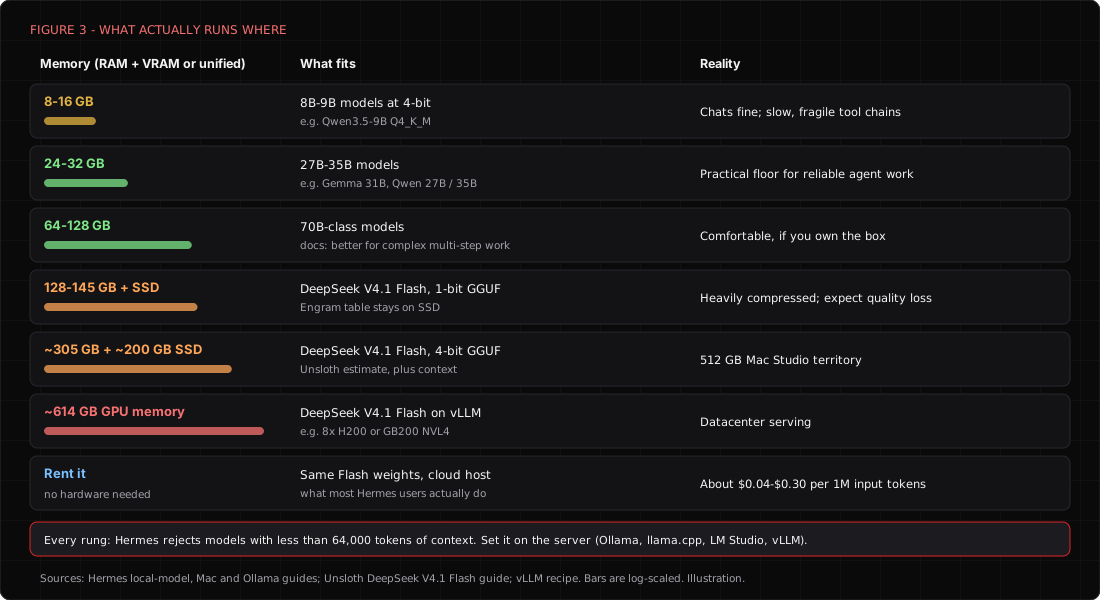
And the model everyone actually uses? DeepSeek V4.1 Flash is open weights, MIT licensed, and genuinely downloadable. It's also a mixture-of-experts model with a 552B-parameter backbone plus a large "Engram" memory table. Unsloth's guide puts the 1-bit quantization at 128 to 145 GB of RAM plus VRAM, and the 4-bit build at about 305 GB, with the Engram table (up to roughly 200 GB) left on SSD. The vLLM recipe for proper serving starts at 614 GB of GPU memory, think eight H200s. NVIDIA even published a playbook for running Hermes against a local Flash on a DGX Station, which is a great reference and an even better reminder of what "local" means for this model.
If you happen to own a 512 GB Mac Studio, we've written about what that machine can and can't do. Everyone else, which is probably most of us, needs another answer.
How DeepSeek Flash became the default brain
That other answer, for most Hermes users, is to rent DeepSeek Flash from the cloud. Nobody seems to have planned it. Nous's docs don't recommend it, and OpenRouter's own Hermes tutorial uses a Claude model as its example default, but the usage numbers tell a different story than the documentation does.
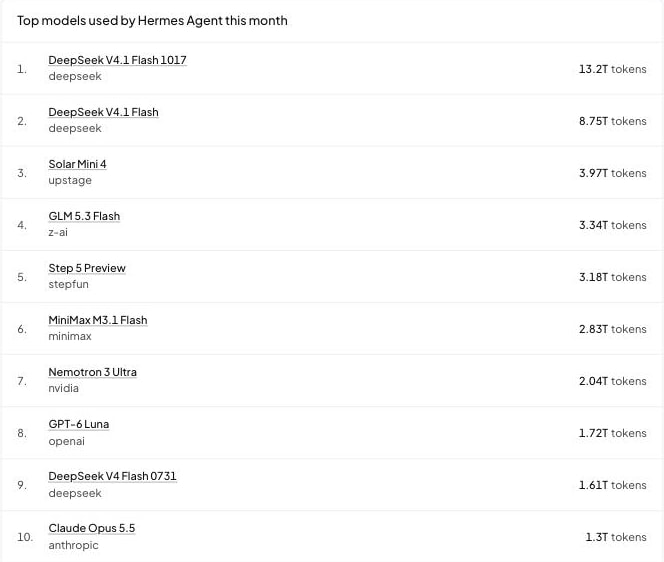
On November 21, DeepSeek V4.1 Flash 1017 led Hermes's monthly list with 13.2 trillion tokens, and the September V4.1 Flash release was second with 8.75 trillion. Add the older Flash snapshots and the family covers roughly half of what Hermes's top twenty models processed. Zoom out to all of OpenRouter and Flash 1017 is the number one model by weekly tokens. On the model's own page, Hermes is its biggest app, slightly ahead of Claude Code. Yes, people are running Claude Code on DeepSeek. We'll get there.
One caveat on that evidence. OpenRouter only sees traffic that goes through OpenRouter, so people calling DeepSeek directly or running locally don't show up, and the true share might be higher or lower. It's the best public signal we found, not a census.
What Flash is, briefly
DeepSeek released V4.1 Flash on September 10 and the 1017 update on October 17. It's a mixture-of-experts model using what DeepSeek calls a Causal Encoder-Decoder design, with about 8B parameters active while reading input and 16B while generating, a one-million-token context window, native vision, and an MIT license. On DeepSeek's own model card, it beats Opus 5 on DeepSWE and loses to it on Terminal-Bench 4.0 and Humanity's Last Exam.
Vendor benchmarks are vendor benchmarks, of course. The independent numbers shown on OpenRouter's model page, from Artificial Analysis and Vals AI, put Flash at roughly 29 to 34 percent on Terminal-Bench 4.0, well under DeepSeek's own 42.3. Different harnesses likely explain part of that gap, but probably not all of it. That's still a very capable model. It's just not a frontier model wearing a discount tag, and my read is that it's good enough for the bulk of agent work and fast enough that you stop noticing it.
When Flash can't see your screenshot
I should be upfront about where Flash stopped working for me. A lot of my daily work is visual. I hand a model screenshots of dashboards, error dialogs, web pages, and sometimes screenshots of plain text I can't be bothered to copy. In my setup, DeepSeek Flash didn't read those images and couldn't make decisions based on them. I saw the same thing in tools other than Hermes, and I think it was Flash, though I didn't record which snapshot or host. For anything visual I ended up on GLM 5.3 Flash instead.
Here's the awkward part. DeepSeek's own docs say that shouldn't happen. The vision guide says deepseek-flash accepts images alongside text and can read text from screenshots, and the pricing page marks vision as supported for it and not supported for deepseek-v4-pro. OpenRouter's vision comparison says only two V4 models accept images, V4.1 Flash and the experimental vision build, and that the other V4 models it lists return text only, including V4 Flash 0731 and V4 Pro 0813. So treat my failure as a field report rather than a verdict on the model. I never tested the current model against the same screenshots, and I haven't found the cause.
Here are the things worth checking if it happens to you.
- Wrong snapshot. The OpenRouter list we looked at earlier still shows older Flash entries next to the new ones, and the comparison above says those older ones are text-only.
- Hermes routing. Per the vision docs, Hermes sends native pixels when the model reports vision support. Otherwise it routes the image through a separate describer model and passes along the text. The docs also say that configuring an explicit
auxiliary.visionbackend selects that describer path even for a vision-capable main model, and an open issue, #149506, asks to change that. A setting calledagent.image_input_modetakesauto,nativeortext, so check what yours is set to. - A client's model definition. OpenCode users reported that its definition for
deepseek-v4-flashdidn't list image input, so it refused images. The issue was closed as not planned. A tool's idea of what a model accepts can differ from the provider's. - A local build without vision. One community GGUF conversion of V4.1 Flash says image input isn't supported because its converter skips the vision tower. The model takes images. That build doesn't.
"Multimodal" covers three different things
It helps to separate what goes in from what comes out, because people (me included) tend to blur them.
- Images in. Flash accepts them per DeepSeek's docs, on the right snapshot and with a client that passes them through.
- Video in. DeepSeek's docs we read describe image input only, and OpenRouter says no V4 model on its catalog lists video as an input. GLM 5.3 Flash lists video. So does Qwen3.8 27B, according to NVIDIA's model card.
- Pictures out. Neither chat model makes them. Flash outputs text only per OpenRouter's listing, and Z.ai's docs list text as GLM 5.3 Flash's only output. In Hermes, real raster images come from a separate
image_generatetool. The image generation docs say the backend is chosen with its ownimage_gen.providersetting, list models such as FLUX 2, GPT Image and Nano Banana through FAL, and say Hermes always requests raster PNG. A vector figure, like the diagrams in this post, is drawn from code instead.
So "it won't make pictures" is true of DeepSeek Flash, but it's true of GLM 5.3 Flash as well, which means it can't be the reason to switch. Video input is a real difference. I can't tell you how much a PowerPoint workflow depends on the model versus the tool wrapped around it, since slide editing usually runs through a file-handling tool, and I haven't tested either model on that.
Pick the model by the job
The better question is what you're asking Hermes to do.
- Text, code and web work. Writing posts, drafting social copy, reading a page's HTML, and interpreting what a script or stylesheet does. Flash is probably the right default here, because it reads markup as text and it's cheap.
- Anything that depends on pixels. Screenshots of dashboards or text, charts, photos, a social post as it renders, a slide as it looks. You need a model that accepts images. Flash on the right snapshot qualifies, and so does GLM 5.3 Flash.
- Anything that needs a new picture. That's the image tool's job. Pick the image backend on purpose, because it sets the quality and the bill, not the chat model.
- Video. Pick a model that lists video input, such as GLM 5.3 Flash.
What GLM 5.3 Flash is
GLM 5.3 Flash comes from Z.ai and is the first natively multimodal model in the GLM-5 line, according to its Hugging Face page. That page lists 320B total parameters with 18B active, under an MIT license. Z.ai's docs list text, image, video and file input, text output, a 1M-token context and up to 128K output tokens, and describe it as a multimodal coding model that specializes in visual programming. On OpenRouter's listing, Z.ai's own line is $0.15 per million input tokens and $0.50 per million output tokens. DeepSeek charges $0.15 and $0.60 off-peak for Flash, and double that at peak.
What you gain and what you lose
Gain first. Images, video and files go in natively, so a screenshot of an error becomes something the model can act on instead of something it politely describes back to you. The context window and the open-weights license match Flash, so you aren't trading much on the spec sheet.
The losses are quieter. DeepSeek's cache hits cost $0.003 per million tokens off-peak, and agents resend the same prefix constantly, so switching models mid-session likely forfeits that discount while the new model's cache warms up. Flash is also the model behind the Bug Hunt Bench numbers we cover later, and we didn't find a comparison on that benchmark that includes GLM 5.3 Flash. And GLM is another China-based provider if you use Z.ai directly, so everything in the privacy section below about where your prompts go applies again. Screenshots can be more sensitive than the text around them, since they may capture open tabs, names and tokens.
My read
My read is that you don't have to pick one. Keep Flash as the everyday brain for its price, and pin a vision-capable model (GLM 5.3 Flash for me today) as Hermes's auxiliary vision model so images take the describer path through something that can genuinely read them. If an image still comes back as mush, check which snapshot you're on before you blame the model.
Where Qwen fits, and where my experience stops
I have not personally used Qwen 4. Alibaba's own Qwen4-Max announcement page wouldn't load for us, so we can't confirm its specs, and Qwen's Hugging Face organization page lists Qwen3.8 models but no Qwen 4 model as of November 21. What I have run is Qwen3.8 Flash Next in NVIDIA's NVFP4 build. It's a very capable model and it just wasn't for me, though I'll admit I didn't give it enough time. The model I plan to dig into next is Qwen3.8 27B NVFP4, and the reason is memory.
The Qwen options for one DGX Spark
NVIDIA's DGX Spark has up to 128 GB of unified memory and 273 GB/s of memory bandwidth. The weights on NVIDIA's 27B card come to about 21.9 GB by the repo's file listing. Flash Next's NVFP4 repo lists about 133 GB of weight files, and one of them (model-fp8-mtp-ple.safetensors) is about 54 GB by itself. By file size alone that's more than one 128 GB Spark holds, so how you run it matters a great deal.
| Model | Total / active params | Weights on disk | Takes in | License |
|---|---|---|---|---|
| Qwen3.8 27B NVFP4 | 27B (the card's count) | about 21.9 GB | text, image, video | Apache 2.0 |
| Qwen3.6 35B A3B FP8 | 35B / 3B active | about 37.5 GB | text, image, video | Apache 2.0 |
| Qwen3.8 Flash Next NVFP4 | 125B / 6B active, plus 51B n-gram embedding and 4B MTP | about 133 GB | text, image, video | NVIDIA Open Model License |
Sizes are the safetensors files in each Hugging Face repo on November 21, 2026. Parameters, modalities and licenses come from the model cards. The Hugging Face metadata boxes disagree with two cards on parameter count (18B against 27B, and 120B against 125B), and we couldn't reconcile that. Qwen's own listing tags Flash Next at 180B, which equals the card's 125B plus its 51B and 4B extras.
The 27B has the clearest advantage on a single Spark. Its 21.9 GB leaves far more headroom than Flash Next for long prompts, several simultaneous sessions and the other services you'll run beside it. It's the one I'd pick for chat, document work and routine coding. The 35B A3B in FP8 looks like the speed candidate, since it activates about 3 billion parameters per token and its 37.5 GB still leaves plenty of room. I haven't measured speed on either, so I won't rank them. Actual speed depends on your serving setup.
Where GLM 5.3 Flash still fits
My own research says GLM 5.3 Flash is still the more capable model. The one independent number we found points the same way. On Artificial Analysis's leaderboard, at the time we looked (an undated snapshot, November 21), GLM-5.3-Flash had an Intelligence Index of 28, Qwen3.8 27B at its highest reasoning setting had 20, and Flash Next had 29. Treat that as one data point from one index, not a verdict.
Cost deserves a careful word, because I'd assumed the Qwen option was cheaper in the cloud. On OpenRouter's Qwen3.8 27B page, the input price starts very low, at $0.035 per million tokens, but the listed providers charge roughly $1.05 to $3.20 per million output tokens. GLM 5.3 Flash is $0.50 at Z.ai, and the cheapest listed GLM provider is under $0.10. The same Artificial Analysis leaderboard lists cost per task at $3.53 for Qwen3.8 27B and $0.58 for GLM-5.3-Flash. So the 27B's big win is local memory headroom, not cloud price. If you rent instead of own, GLM 5.3 Flash looks like the cheaper way to get a model that accepts images.
My honest answer, if you're new
If you're new to any of this, start with Hermes. It's the part that makes the rest of the choices low stakes, because you can swap the model behind it with hermes model and keep everything else.
And if this section sounds like I'm confused about what to pick, I generally am. That's also the fun of running things outside the frontier labs' products. You get to choose what works for you, work out why, and change your mind next month when a new model shows up. It's a ton of work, but it builds your skills in a way that renting one polished assistant never will.
The price is the whole story
Here's DeepSeek's own price list for deepseek-flash, in US dollars per million tokens.
| Token type | Off-peak | Peak |
|---|---|---|
| Input, cache hit | $0.003 | $0.006 |
| Input, cache miss | $0.15 | $0.30 |
| Output | $0.60 | $1.20 |
Peak hours are 1 a.m. to 4 a.m. and 6 a.m. to 10 a.m. UTC on weekdays, which is the Chinese business day. Everything else, including weekends, is half price. If you're in the Americas, you're mostly working off-peak without trying, which is a strange sentence to write about a cloud bill.
For comparison, Claude Sonnet 5.5 is $2 in and $10 out, and Opus 5.5 is $4 and $20 (Anthropic pricing). Off-peak Flash is roughly 13 times cheaper than Sonnet on input and about 17 times cheaper on output. Cache hits, which agents rely on heavily because they resend the same prefix constantly, are around 33 times cheaper.
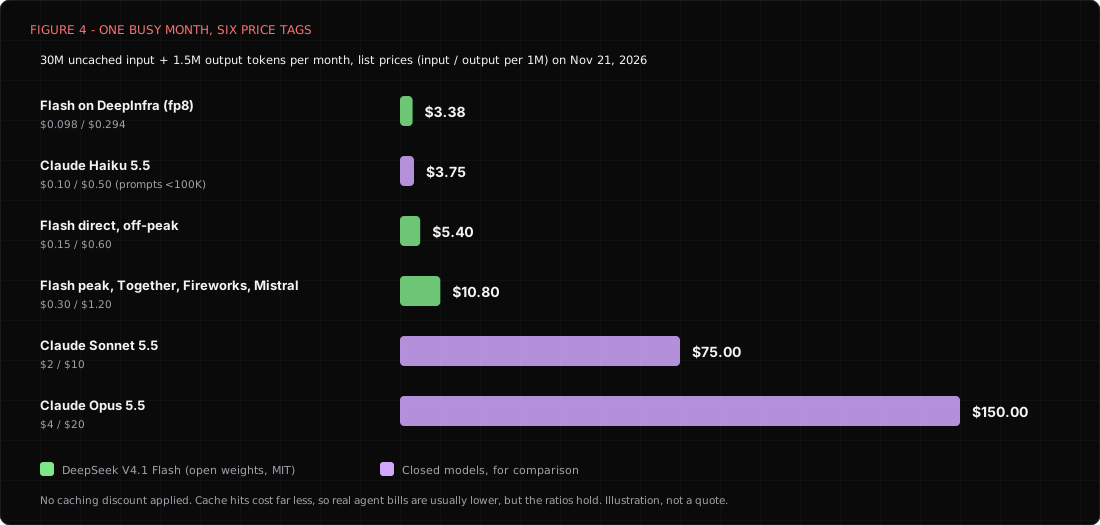
That's very likely the whole reason Flash won. A Hermes user on the official user stories page reports spending "less than $10 a month" across GLM 5.3, Kimi K3 and DeepSeek Flash. The dashboard's own cost view tells a similar story.
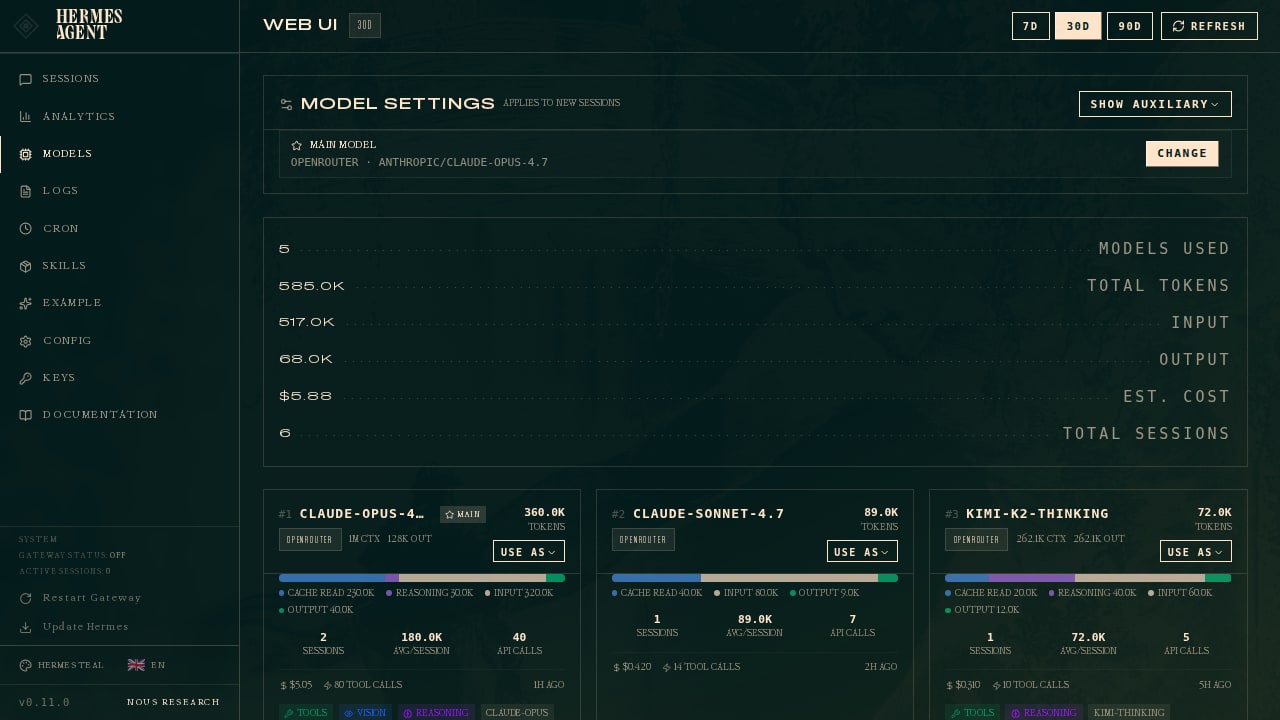
Two honest caveats, though. First, cheap closed models exist too. Claude Haiku 5.5 is $0.10 in and $0.50 out for prompts under 100,000 tokens, and GPT-6 Luna lists at the same price, so "only Chinese open weights are cheap" isn't true anymore. Flash probably wins on capability per dollar rather than on price alone. Second, the cheapest third-party Flash endpoints often run FP4 quantizations, and a provider charging four cents per million input tokens is most likely not serving the same numerics as one charging thirty. Quantization isn't automatically bad, but it's a variable you should know you're choosing, because two "Flash" endpoints might not behave like the same model on a long tool chain.
In most cases, setting it up takes a minute. Run hermes model, pick DeepSeek, OpenRouter, or another host that carries Flash, and paste a key. Which host you pick likely matters more than most people realize, so let's talk about that.
The Chinese-provider question: where do your prompts actually go?
This is where a lot of conversations go off the rails in both directions. One camp says anything with "DeepSeek" in the name is a pipe to Beijing. The other says open weights are just math, so who cares. Both are probably wrong in useful ways, and the truth is probably more boring and more actionable than either camp would like.
Here's the mental model I'd use. The model weights are a recipe. The host is the restaurant kitchen. A recipe developed in Hangzhou doesn't phone Hangzhou every time someone in Ohio cooks it. What matters for your privacy is whose kitchen you walked into, what that kitchen writes down about your order, and how long it keeps the notes. Where the recipe came from may still matter, just for a different reason, and we'll get to that too.
Path one: DeepSeek's own API
If you point Hermes at api.deepseek.com, you're in DeepSeek's kitchen. DeepSeek's privacy policy, last updated February 10, says it collects, processes and stores personal data in the People's Republic of China. It lists user input among the data used to train and improve its technology, offers an opt-out from training, mentions sharing within its corporate group for "foundation model training and optimization," and allows disclosure in response to government requests. The API terms of service are governed by PRC law and are silent on whether API inputs are used for training, which means the safest reading is probably the privacy policy's broader one.
None of that is hidden. It's in the documents. For personal tinkering on public code, plenty of people seem to decide that's an acceptable trade for the lowest first-party price. For client data, regulated data, or anything you'd be embarrassed to see in a training set, I'd treat it as a non-starter. It's worth remembering that the US Department of Homeland Security ordered DeepSeek products removed from federal civilian agencies in July. Your threat model may not match a federal agency's, but it's a useful data point.
Path two: the same weights, hosted somewhere else
Because the weights are MIT licensed, anyone can serve them. When we pulled OpenRouter's endpoint list for Flash 1017, there were 51 live endpoints from dozens of providers, priced anywhere from about four cents to thirty cents per million input tokens. OpenRouter's zero-data-retention list marked 43 of those 51 as ZDR-eligible. The eight that weren't included DeepSeek itself, three China-headquartered providers (Baidu, StepFun and StreamLake), Singapore-headquartered Alibaba Cloud International and SiliconFlow, plus Novita and Ambient. OpenRouter's per-endpoint metadata flagged only DeepSeek's own endpoint as training on prompts.
Several US and European hosts go out of their way to promote privacy, and they say so in writing.
- Together AI says in its privacy docs that open models run on its own infrastructure and don't call out to the model author, and that DeepSeek models run in North American data centers. But Together stores prompts and responses by default until an admin turns storage off, and its "passthrough" toggle, which forwards some models to upstream providers, is on by default.
- Fireworks says in its privacy policy that it doesn't log or store prompt or generation data for open models without opt-in, and doesn't train on your data without opt-in.
- DeepInfra says in its data privacy page that it holds inference data in memory only, doesn't log request content, and doesn't train on your data.
- Parasail says in its privacy policy that it doesn't store or log serverless or dedicated inputs, though batch inputs are kept for about 30 days.
- Nebius says in its legal guide that it doesn't train on your content, but without ZDR switched on it may store inputs and outputs in Finland for speculative decoding.
- Mistral serves Flash 1017 from France at $0.30 in and $1.20 out, per its pricing page, and its endpoint was on OpenRouter's ZDR list.
Others are vague. Baseten's public privacy policy excludes inference data entirely and points to a customer agreement we didn't review. SiliconFlow's policy, from a Singapore entity, says nothing about training or retention of prompts and allows sharing with affiliates. Novita's policy page didn't render for us at all, which isn't evidence of anything bad, but it isn't reassuring either.
So, do hosts quietly ship anonymized prompts back to China?
We looked specifically for evidence that any third-party host sends prompts, anonymized or not, back to DeepSeek or another Chinese lab for training. We didn't find any. The available evidence points the other way, from Together's explicit statement to OpenRouter's per-endpoint flags. An independent survey, Who Reads Your Prompts, reached the same conclusion.
But "no evidence found" isn't "verified safe," and I want to be precise about why. A privacy policy that doesn't mention model developers doesn't promise anything about them. Many policies reserve the right to use "aggregated or de-identified" data broadly, and that language could cover more than you'd guess. Defaults like Together's prompt storage or passthrough flip the answer depending on a setting you've probably never opened. Policies change, and you likely won't get an email when they do. And if you let a router pick the cheapest endpoint, you might land in a China-headquartered kitchen on Monday and a US one on Tuesday without noticing.
Some hosts genuinely promote privacy, some are silent, and silence isn't a policy you can rely on. The only honest position is that you don't know until you check, and then you check again next quarter, because the answer you got this month might not hold next month.
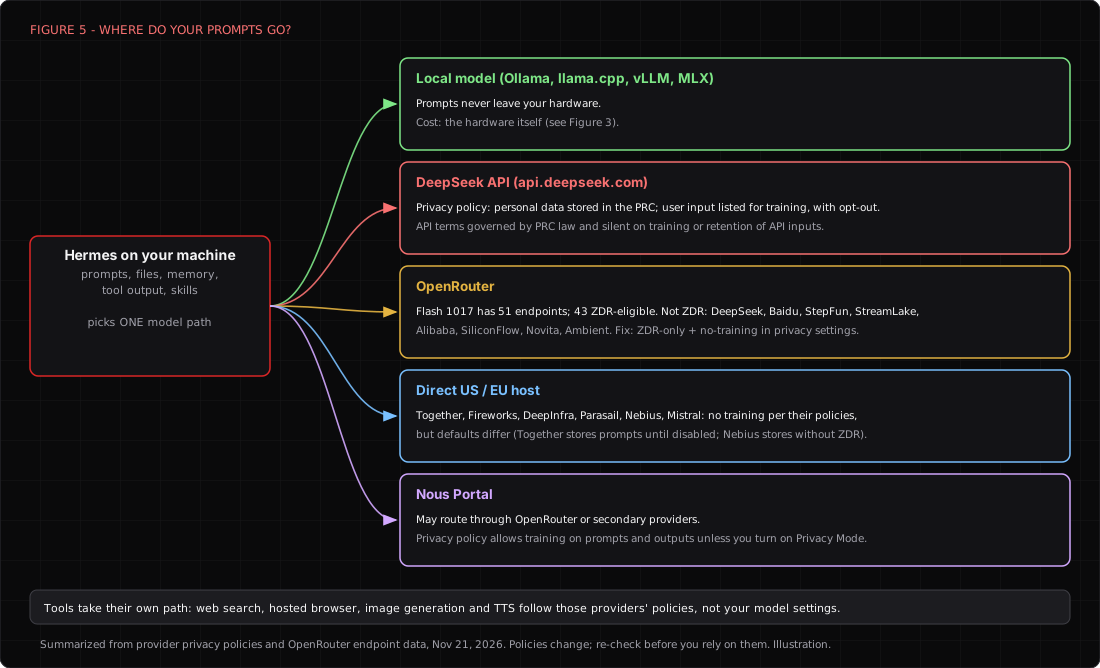
If you route through OpenRouter, the cheapest fix is account-wide. In your OpenRouter privacy settings, allow only zero-data-retention endpoints and disable providers that train on prompts. Those settings apply to every request on the account, whatever client sends it, so you probably don't need Hermes to support anything special. If you write your own requests, OpenRouter also accepts per-request preferences.
{
  "model": "deepseek/deepseek-v4.1-flash-1017",
  "provider": {
    "zdr": true,
    "data_collection": "deny"
  }
}
Two more leaks people seem to forget. Hermes's tools have their own data paths, so web search, the hosted browser, image generation and text to speech go to whoever runs those services, regardless of your model settings. OpenRouter's docs make the same point about its plugins. And if you use Nous Portal, its privacy policy allows prompts and outputs to be used to "train, fine-tune, evaluate" models unless you enable Privacy Mode, which has documented limits, and the Portal docs say requests may route through OpenRouter or other providers. That's an American company, and it's still a training default you have to switch off yourself.
The part that hosting doesn't fix
Moving the kitchen fixes where your data goes. It doesn't change the recipe. That leads to a topic that deserves its own article, so I'll only flag it here and stay out of the weeds.
WARNING
Beyond the scope of this post, but you should know it. Models trained in China can carry built-in bias on politically sensitive topics, even when they're hosted in the US and never talk to a Chinese server. NIST's CAISI evaluated DeepSeek models in 2025 on its own servers using downloaded weights, and found they echoed Chinese Communist Party narratives about four times as often as US reference models. It concluded that the censorship is built into the models themselves. CrowdStrike reported that politically sensitive trigger words made DeepSeek R1 write less secure code. Those studies covered older DeepSeek models, and we found no comparable public test of V4.1 Flash, so the effect in the current model might be larger, smaller or different. For coding and log parsing, this may not matter to you at all. For research, policy, news or anything touching geopolitics, treat the model's answers as most likely having a point of view.
Nous, interestingly, seems to agree that it's a real problem. In November it released Arete-27B, a fine-tune of a Chinese Qwen model aimed at reducing state-propaganda answers. Which brings us neatly to the other thing open weights let you do.
Open weights, abliteration and the "obliterated" models
Open weights are probably the main reason this whole ecosystem works. You can run them anywhere, inspect them, fine-tune them, and keep using them after the vendor deprecates them. They also create real price competition, which is how one model ends up with 51 hosts racing each other toward four cents. None of that is possible with Duet, Muse or dots.
They also let you change the model's personality in ways a vendor never would. The best-known technique is abliteration. Researchers find the internal direction in a model's activations that seems to correspond to "refuse this request" and project it out of the weights, and the result answers things the original would decline. Within weeks of Flash 1017 shipping, Hugging Face filled up with variants. Some use "abliterated" in the name, and one literally ships as OBLITERATUS's "obliterated" release, which reports refusals falling from 81.6 percent to 4.3 percent with MMLU nearly unchanged. Another, from OrcaRouter, reports 87.4 percent dropping to 7.4 percent on 500 harmful prompts. These are publisher-reported numbers on publisher-chosen tests, so read them as claims, not measurements. We covered how attackers use these models in The Uncensored AI Underground.
Why would a legitimate practitioner want an unguarded model? Most likely because hosted models refuse a lot of normal security work. Ask for help reversing a malware sample, writing a detection for a specific exploit, or generating phishing simulations for an authorized awareness program, and a cautious model might lecture you instead. Red teams testing their own AI products need a model that will play the adversary, and researchers studying refusal behavior need to measure what happens without it.
Two caveats are worth carrying with you. First, abliteration removes refusals, not worldview. Research on distilled DeepSeek models found that ablation eliminated refusals but cut evasive answers on CCP topics only from 18.8 percent to 12.5 percent (arXiv), which the authors described as narrative steering. Second, these are the same giant models from the hardware section. An uncensored Flash at 4-bit still wants hundreds of gigabytes of memory, so for most people "local and unguarded" probably means renting a GPU box, with all the hosting questions above.
WARNING
An abliterated model plus Hermes's approvals.mode: off plus the default local backend is an agent with no refusals, no human in the loop and full access to your machine. Don't run that combination against anything you aren't explicitly authorized to test, and don't run it on a host you care about. Removing a model's guardrails moves the responsibility to you. It doesn't remove it. Educational intent isn't authorization, and "the model said yes" isn't a legal defense.
Hermes as a coding harness
This is where the conversation gets spicy. A lot of developers have started using Hermes, or something like it, in place of Claude Code or Codex, most likely because they want to use a cheaper model like Flash. That's a reasonable instinct. It's worth being clear-eyed about what you trade.
First, the context. You can point Claude Code itself at other models. It honors ANTHROPIC_BASE_URL, and DeepSeek publishes an official guide that maps Claude Code's model tiers onto its Anthropic-compatible endpoint. Anthropic's gateway docs are equally clear that it doesn't support routing Claude Code to non-Claude models, so you're on your own when something breaks. Codex CLI officially supports custom model providers in its config, and --oss runs it against local Ollama or LM Studio. So "Claude Code with DeepSeek" is real, and judging by OpenRouter's app stats, it's popular. The open harnesses are the alternatives built to be model-agnostic from day one.
What Hermes brings to a repo
Hermes has more coding plumbing than its "personal assistant" reputation suggests. File edits take checkpoints you can undo with /rollback. After every write or patch, it runs language-server diagnostics automatically, on by default across about thirty languages, in git repos (LSP docs). You can run a session in its own git worktree with hermes -w, or give each subagent its own worktree. hermes acp connects it to Zed, VS Code (through the ACP Client extension) and JetBrains, with allow-once, allow-for-session, allow-always and deny approvals (ACP docs).
What it doesn't have, as far as we could tell, is a dedicated plan mode, and its IDE integration is younger than the competition's. The most telling detail is Nous's own comparison page, which pitches Hermes as a companion that hands coding to Claude Code rather than a replacement for it. Perhaps the clearest signal is that Hermes ships bundled skills for driving the Claude Code and Codex CLIs. When the vendor tells you its agent is the manager and not the engineer, I'd probably take the hint.
The three alternatives people actually compare
OpenCode (anomalyco/opencode, MIT, about 228,000 stars) is likely the closest thing to an open Claude Code. It has separate build and plan agents (plan is read-only), subagents, MCP, plugins, built-in LSP for around 35 languages (off by default), ACP, and a desktop beta. It likely works with any provider you'd realistically want. Its paid side, Zen or Console, adds a 4.6 percent plus 31-cent fee per credit purchase, and Go costs $10 a month. Worth knowing that the hosted Console had a breach in October that exposed saved API keys for about 1.4 percent of Console users. The CLI wasn't affected, but if you stored keys there, rotate them. We wrote it up in detail here.
DeepSeek Harness (dsh, deepseek-ai/deepseek-harness, MIT) is DeepSeek's own. It's a plugin-everything design you launch with npx @deepseek-ai/dsh web, which opens a web UI, with desktop apps for Apple silicon Macs and Windows. Its package list covers planning, subagents, skills, MCP, LSP, ACP, sandboxing, scheduling, computer use and browser use. It supports other providers too, through the same LLM library that powers Pi. DeepSeek says the 1017 model was optimized for it, which probably explains some of its benchmark results. It's also labeled a developer preview with breaking changes ahead, and its own SAFETY.md says it hasn't had a security audit and must not be treated as secure. Points for honesty.
Pi (earendil-works/pi, MIT, about 123,000 stars) is the minimalist. Four tools (read, write, edit, bash), a system prompt plus tool definitions under a thousand tokens, and no permission prompts at all. No subagents, no plan mode, no to-do lists by design (Mario Zechner's write-up). Pi 1.0 added native MCP. It's the engine under OpenClaw, and it has a fiercely loyal following among people who want the model to do the thinking and the harness to stay out of the way.
| Hermes Agent | OpenCode | DeepSeek Harness | Pi | |
|---|---|---|---|---|
| Built for | Always-on assistant that also codes | Coding in the terminal | Coding with DeepSeek first | Minimal coding loop |
| Main interface | CLI, TUI, desktop, web, chat apps | TUI, desktop beta, web | Web UI and desktop | TUI, JSON, RPC, SDK |
| Plan mode | Not found | Yes (read-only plan agent) | Yes (plan package) | No, by design |
| LSP after edits | On by default | Built in, off by default | Package available | No |
| Subagents | Yes, with worktrees | Yes | Yes | No |
| Permission prompts | Smart, manual or off | Yes | Yes | None |
| First-request overhead (BetterClaw, vendor) | ~10.4k tokens | ~5.1k | Not measured | ~1.5k |
| Maturity signal | Fast-moving, patched CVEs | Mature, hosted-side breach | Developer preview, unaudited | Stable, tiny surface |
What the benchmarks say, carefully
There's exactly one same-model, head-to-head harness benchmark we found that includes Hermes. ProductCompass's Bug Hunt Bench ran every harness on DeepSeek V4.1 Flash against 105 planted bugs with a blind judge.
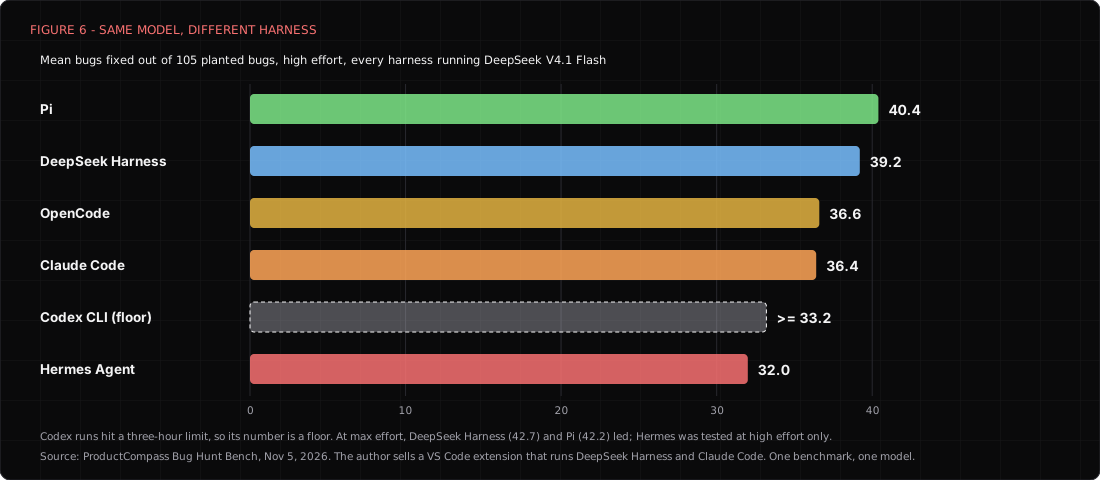
At high effort, Pi fixed the most bugs on average (40.4), DeepSeek Harness came next (39.2), OpenCode and Claude Code landed together around 36.5, and Hermes trailed at 32.0. At max effort, DeepSeek Harness edged Pi on bugs fixed but cost more than twice as much per run ($1.84 versus $0.83), and the author's own statistics show its gap over Claude Code wasn't significant. Note the conflict of interest in the caption, and note that one benchmark on one model with one judge probably shouldn't settle anyone's tooling debate.
A different vendor test points the other way for non-coding work. Composio ran Kimi K3 through 25 app-automation tasks, and the vendor reports Hermes passing 20 at $0.46 per success while Claude Code passed 19 at $1.96. Composio still recommended Claude Code for repository work. Put those together and a pattern seems to emerge, in which Hermes's heavier prompt and broad toolset likely cost it on focused code fixing and pay off on messy, multi-app chores.
WARNING
Coding agents read untrusted input for a living. CVE-2026-71963 let a malicious repository run code through a crafted .git/config the moment Hermes ran git status, in versions 0.18.2 through 0.21.0. Update, and clone anything you didn't write into the Docker backend, not your laptop.
My take on the coding question
If your work is mostly inside one repository, I'd use OpenCode or Pi with Flash, or point Claude Code at a DeepSeek endpoint if you can live without vendor support. They're leaner, they're built for it, and the only head-to-head numbers we have appear to favor them. If you want one agent that triages your inbox at 7 a.m., watches a Slack channel, runs a nightly cron job, and occasionally fixes a bug, Hermes is probably the better home, and its bundled skills let it hand serious coding to Claude Code or Codex when it's worth paying for a stronger model.
GUI or CLI: picking a front end
Hermes has more front ends than most products have settings, and they all share the same config, sessions, skills and memory. Here's what each one is for.
- Classic CLI (
hermes). The shipped default and the most battle-tested. - TUI (
hermes --tui). A richer terminal interface with overlays, a session switcher and a status line. It needs Node 20 or newer, and the docs call it the recommended way to run Hermes interactively. - Hermes Desktop (
hermes desktopor the installers). An Electron app with streaming tool activity, a file browser, previews, a terminal, a git pane, subagent monitoring and voice. Installers exist for Apple silicon Macs and Windows. Intel Macs aren't supported by the installer, Linux has no packages yet, and desktop plugins aren't sandboxed (desktop docs). The official preview image is still captioned beta. - Web Dashboard (
hermes dashboard). Admin pages for sessions, skills, MCP servers, cron, channels, config and API keys, served on localhost port 9119. It has no login on loopback and forces an auth provider if you bind it to anything else (dashboard docs). - Webapp, new in v0.23.0. The full desktop workspace in a browser tab, served by your own gateway, off by default.
- Editors and chat apps. ACP for Zed, VS Code and JetBrains, plus the messaging gateway for everything from Telegram to IRC.
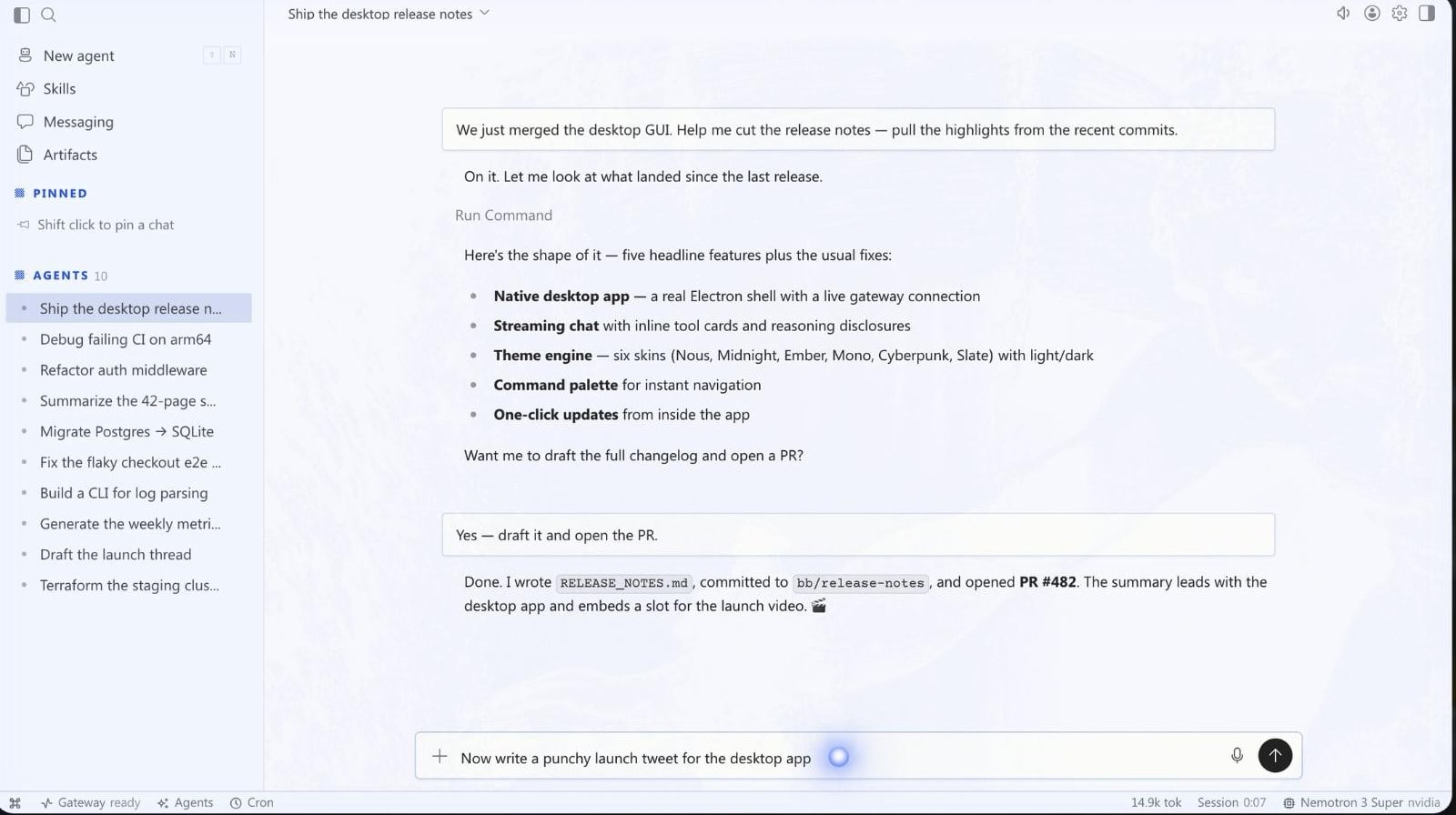
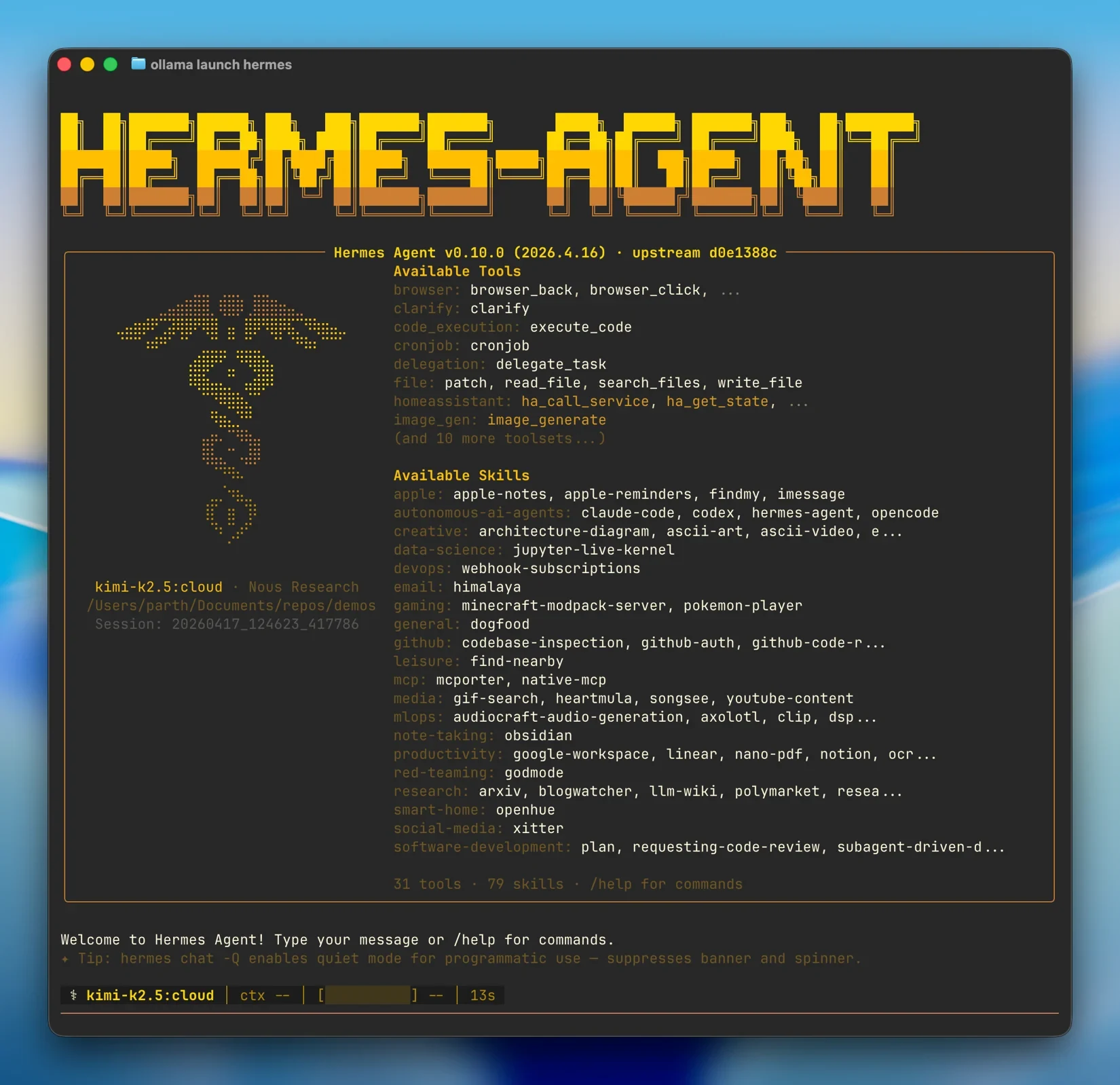
| GUI (Desktop, Webapp, Dashboard) | CLI and TUI | |
|---|---|---|
| Best at | Watching long tasks, reviewing files and diffs, managing sessions, cron and skills | Speed, scripting, SSH, servers, low resource use |
| Learning curve | Gentle | Moderate, but the docs are good |
| Where it runs | Desktop on Mac and Windows, webapp anywhere with a browser | Anywhere Python runs, including headless boxes and Termux |
| Visibility | Excellent, you see tool calls, files and subagents | Good, but you have to scroll |
| Security notes | Desktop plugins aren't sandboxed, dashboard is unauthenticated on loopback | Smaller surface, nothing listening by default |
| Maturity | Newer, beta-labeled | The original and most tested |
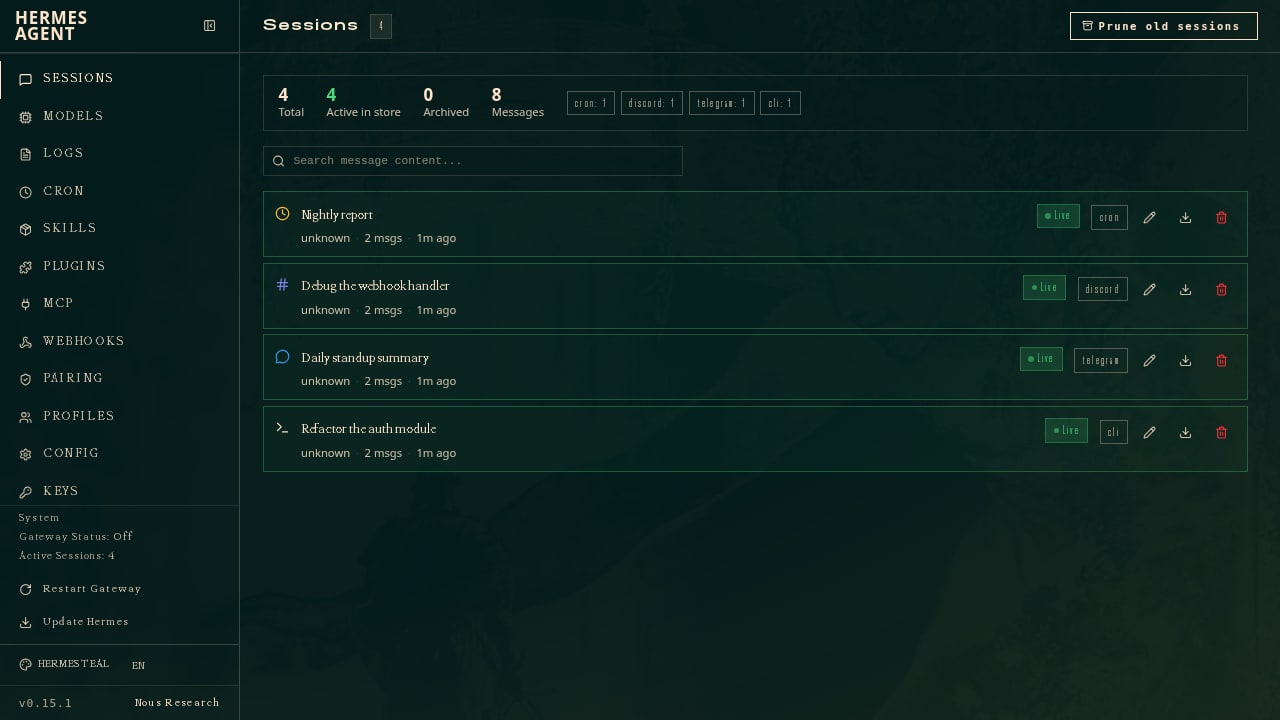
So which should you choose? I'd say it mostly depends on where the agent lives. If Hermes runs on your laptop and you want to watch it work, the desktop app is probably the nicer experience, and the file and git panes make reviewing changes much less painful. If Hermes runs on a server (which is where an always-on agent arguably belongs), the CLI or TUI over SSH is the natural fit, with the dashboard reached through an SSH tunnel when you want the admin pages. In most cases people seem to end up using both, which is exactly what the shared gateway is designed for.
One firm rule, whichever you pick. Don't expose the dashboard or webapp to the internet by binding them to 0.0.0.0 and hoping. Hermes will force authentication when you do, which is good, but an agent control panel with shell access is the last thing you want indexed by a scanner. Tunnel to it instead.
Nous Research: who's behind it, and how they get paid
Nous Research started in 2023 as an open-source research collective and is now a New York company. Its founders include Jeffrey Quesnelle, Karan Malhotra, a pseudonymous researcher known as Teknium, and Shivani Mitra, per The Block. It's best known for the Hermes family of fine-tuned open models (Hermes 4 shipped in August 2025) and for distributed training research. Its DisTrO work and the Psyche network, which coordinates training runs over Solana smart contracts, are aimed at training models without a single giant data center. It also builds Atropos, a reinforcement-learning framework, and released NousCoder-14B and the Arete-27B model mentioned above.
The money side has gotten serious. Nous raised a $50 million Series A led by Paradigm in April 2025, reportedly at a $1 billion token valuation. In October it closed a $90 million Series B led by Robot Ventures, with Nvidia, M12, Samsung, Y Combinator, USV and Menlo participating (Tech Funding News). The Wall Street Journal reported a $1.5 billion valuation and about $36 million in annualized revenue. Nous didn't confirm the valuation itself, so treat those two figures as reported, not official. The round is aimed at "Hermes for Businesses," which suggests the enterprise market, not hobbyists, is where Nous expects the real revenue.
How a free agent makes money
The agent is free. The Nous Portal isn't. Portal is an inference and tools service with four plans. Free is pay-as-you-go with free models only. Plus is $20 a month and adds paid models, hosted tools and a small cloud agent. Super is $100 with five times Plus's allowance, and Ultra is $200 with ten times. The Tool Gateway bundles paid services like web search, image generation, text to speech and a cloud browser behind one login, billed per use.
And the agent nudges you toward it. The quickstart calls Portal the "easiest path," hermes setup --portal wires up a model and the Tool Gateway in one OAuth step, and a free nous/welcome model lets you start without an account. That's not sinister. It's a classic open-core funnel, and it's well done.
What Nous gets when you use Hermes
Three things, as far as we could tell.
- Distribution. Every install is a potential Portal customer and, it seems, increasingly a potential enterprise lead. Nous claims more than 24 million clones and an internal estimate of about 2.5 percent of global AI token usage. Being OpenRouter's number one app is probably marketing money can't easily buy.
- Data, if you use Portal. As covered above, Portal's privacy policy permits training on prompts and outputs unless you turn on Privacy Mode. The agent's own telemetry, by contrast, is opt-in and off by default, and we found no evidence that Nous collects agent traces from people who don't use Portal.
- A training flywheel. Hermes ships Atropos environments and trajectory tooling. A lab that trains models likely benefits enormously from a popular agent that defines what good agent behavior looks like, even if you never send it a byte.
Is Portal a good deal compared with going direct?
For Flash, mostly yes, because it seems to sit at price parity. When we checked, Portal listed the 1017 snapshot at $0.15 in and $0.60 out, which matches DeepSeek's off-peak price, and Claude models at Anthropic's list prices. The subscriptions are where the value question lives, since they bundle the cloud agent and tools you might not need.
| Route | DeepSeek V4.1 Flash (in / out per 1M) | Claude Sonnet 5.5 | Fees and subscriptions |
|---|---|---|---|
| DeepSeek direct | $0.15 / $0.60 off-peak, $0.30 / $1.20 peak | n/a | Prepaid balance, no fee |
| Nous Portal | $0.15 / $0.60 (1017 listing), other Flash listings vary | $2 / $10 | Free, Plus $20, Super $100, Ultra $200 per month |
| OpenRouter | Depends on endpoint, about $0.04 to $0.30 input | $2 / $10 | 5.5% fee on credit purchases, BYOK free up to $25k a month |
| OpenCode Zen / Console | $0.30 / $1.20 | $2 / $10 | 4.6% plus $0.31 per purchase, or Go at $10 a month |
| Mistral | $0.30 / $1.20 | n/a | Vibe Pro $14.99 a month for its own CLI |
If you're price-obsessed and comfortable with DeepSeek's terms, going direct off-peak is the floor. If you want privacy controls and choice, OpenRouter with ZDR-only routing is probably the most flexible option, and the 5.5 percent fee is the price of that switchboard. Mistral is likely the easy pick if you want a European company serving the model under European law. Portal makes the most sense if you'll actually use the hosted cloud agent and tools, and if you remember to turn on Privacy Mode.
A hardening checklist before you hand it the keys
None of this is exotic. It's the same discipline you'd apply to any service account with shell access, which is exactly what an agent is.
hermes update                              # stay at or above 0.23.2
hermes config set terminal.backend docker  # tools run in a container, not on your host
hermes config set approvals.mode manual    # you approve risky commands while you build trust
hermes doctor                              # check the setup
- Patch. Several of the CVEs above were serious. Run
hermes updateon a schedule. - Sandbox the tools. Use the Docker backend, or SSH into a disposable VM. Review what you forward into it with
terminal.docker_forward_env,terminal.env_passthroughandterminal.credential_files, because a sandbox full of your secrets isn't much of a sandbox. - Keep approvals on. The default
smartmode lets a model judge risk. Start withmanual, and leavecron_mode,single_query_modeandunattended_modeat their default ofdenyso headless jobs can't approve dangerous commands for themselves. - Review what it learns. Turn on
skills.write_approvaland keep~/.hermes/skillsin git, so a poisoned skill shows up as a diff instead of a mystery. - Lock down the gateway. Leave
gateway.allow_all_usersoff, use allowlists and DM pairing, and never put the dashboard on a public interface. - Keep private networks private. Leave
security.allow_private_urlsandbrowser.allow_private_urlsoff unless you need the agent to reach internal hosts. - Scope the money. Give Hermes its own API keys with spend limits. Cheap models make runaway loops cheap, not free, and a stuck agent might retry for hours before anyone notices.
- Choose your data path on purpose. Set ZDR-only routing on OpenRouter, read your direct host's defaults, and turn on Privacy Mode if you use Portal.
The part that actually changed
What's new here isn't the agent. We've had agents with tools and memory for a while. What changed this year is that the three expensive parts of running one got cheap at the same time, because the software is free, the model costs fifteen cents, and the hosting is a $5 VPS. When everything costs almost nothing, the only expensive thing left is the decisions, and the hosted agents make those for you while Hermes doesn't.
That's both the appeal and the risk. Duet, Muse and dots each made a set of choices about models, data, approvals and liability, and you accept them as a package. Hermes hands you every one of those choices, along with a terminal and a cron scheduler. Which model reads your prompts. Which kitchen keeps the notes. Whether your agent can approve its own commands at 3 a.m. Whether the skill it wrote last Tuesday came from you or from a web page it summarized.
My working assumption is that most people won't make those choices deliberately. They'll take whatever the setup wizard picked, the cheapest endpoint the router found, and the defaults that shipped in June. That's how a fifteen-cent model ends up handling client data in a jurisdiction nobody checked.
The agent is free. The tokens are almost free. Your judgment is the only part you can't download, so it's worth spending a little of it before you hand over the keys.

Founder · Dr. Chaos
Aamir Lakhani is a leading senior security strategist responsible for providing IT security solutions to major enterprises and government organizations. He creates technical security strategies and leads security implementation projects for…