ARTEX Up Close: Installing, Running, and Hunting a Multi-Agent AI Pentest Framework

The pitch for tools like ARTEX usually arrives as some version of "an autonomous pentest team in a box." It's a catchy line, and it's about two thirds true. The box part is real (it ships as a Docker Compose stack). The autonomous part is real enough to be uncomfortable. The team part is where the marketing outruns the engineering, because what you actually get is a planner, a few tireless workers, a pile of very familiar open source tools, and a language model making judgment calls at whatever quality you're paying for.
We spent this week taking ARTEX apart for practitioners. This post walks through where to get it now that the original project is gone, how to install and configure it in a lab without hurting yourself, how it actually works once a task is running, where it falls down, how it can help a security team, and how to detect and slow it down when someone points it at you. We built the walkthrough from the code itself at a pinned commit (the install script, compose file, Dockerfile, README, and design notes), so treat the UI descriptions as documented behavior rather than our own test results. This autumn, ARTEX turned up in public incident reporting from several research teams, which I covered in The Uncensored AI Underground. So this isn't a hypothetical tool. Defenders should understand it at the same level its users do.
Ground rules before you touch it
This is an offensive tool that runs real scanners and real exploitation tooling with an AI deciding what to run next. Read that sentence twice. Everything below assumes a lab you own, or a target you have written authorization to test, and that authorization should name automated and AI-driven testing explicitly. A lot of rules of engagement were written for humans who type one command at a time, and an agent that fires a few hundred requests a minute at a production login page can turn a polite assessment into an outage report.
The maintainers agree, for what it's worth. The fork's README limits use to systems you own, isolated labs, and bug bounty or disclosure programs inside their published scope. The original author's terms were stricter still and (according to an English walkthrough published October 8) restricted use to local, isolated environments even for systems you own. Those terms changed between the original and the fork, so read the README and LICENSE at the exact commit you deploy. I'm not a lawyer, and an open source license doesn't authorize you to scan anything. Your client does.
WARNING
Run ARTEX only against a lab you control or a target with written authorization that covers automated, AI-driven testing. Educational intent is not legal authorization, and an agent that decides on its own to try a credential spray is still your credential spray.
What ARTEX actually is
ARTEX is a multi-agent, LLM-driven penetration testing system with a Go backend, a Next.js frontend compiled into the same binary, and PostgreSQL for state. It was originally published by the GitHub user Autumn-27, who also wrote the ScopeSentry asset discovery platform, and the two integrate directly.
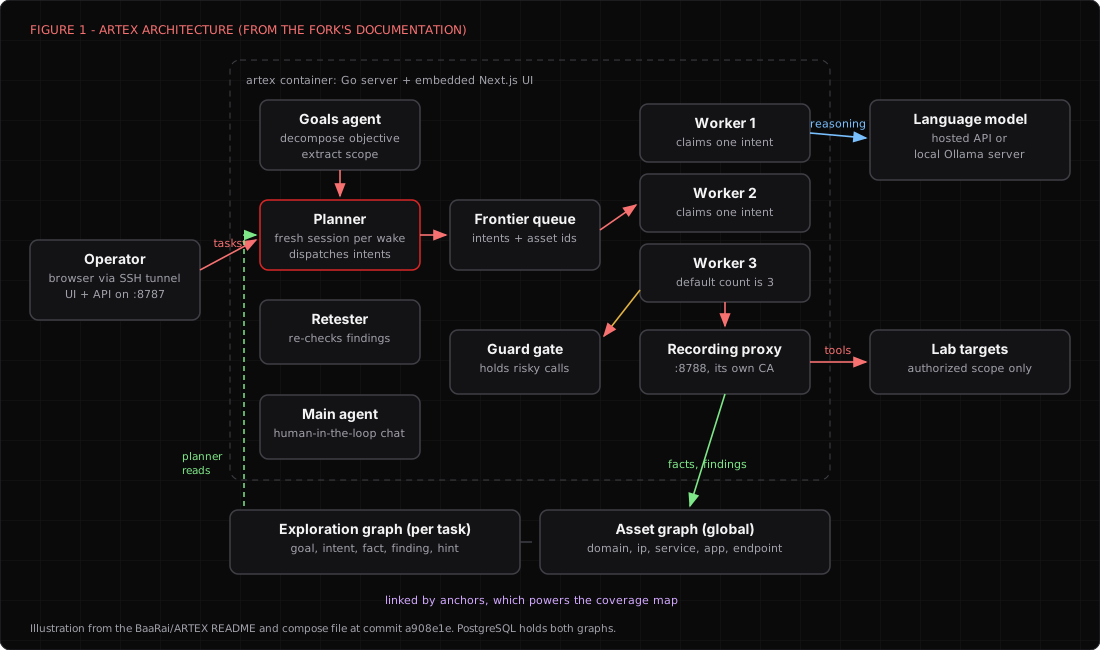
Underneath the dashboard there are a handful of distinct agent roles. A goals agent breaks your objective down and extracts scope. A planner reads the state of the task and decides what to try next, expressed as small units of work the project calls intents. A pool of workers (three per task by default, set in System Settings) each claims one intent, runs real tools through a Bash and HTTP interface, writes what it learned back to the database, and stops. A main agent handles the human-in-the-loop chat, and a dedicated retester agent re-checks findings after a fix.
The interesting design decision is the memory. ARTEX keeps two graphs. The asset graph is global and holds root domains, subdomains, IPs, services, apps, and endpoints, grouped by company. The exploration graph is per task and records goals, intents, facts, findings, and hints, linked by edges like spawns, derived_from, yields, and proves. Anchors tie the two together, which is how the coverage map can show you which assets got tested and which ones the agents never touched. That second view is honestly one of the more useful things in the product.
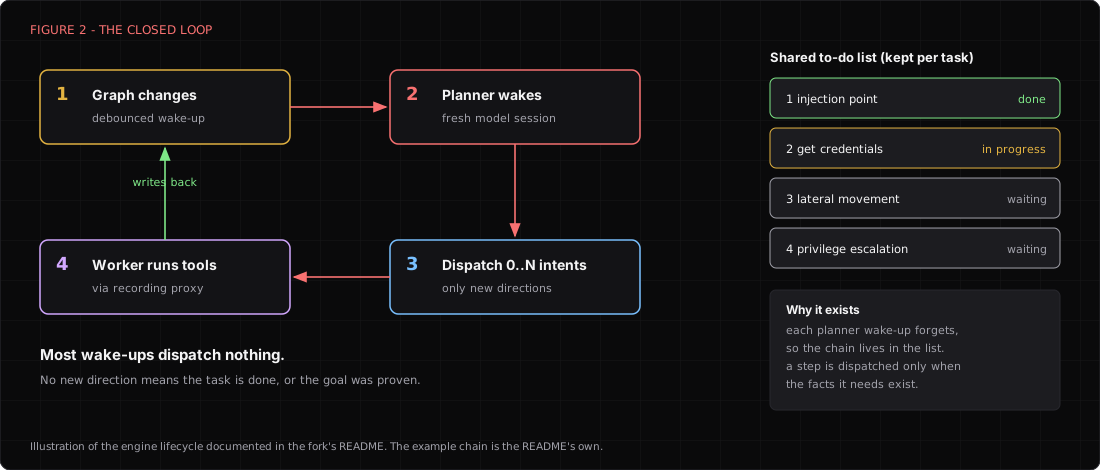
The engine is event-driven. Any change to the graph wakes the planner, the planner dispatches zero or more intents, workers execute and write back, and the write-back wakes the planner again until the goal is proven. Every planner wake-up is a fresh model session, so the project keeps a shared to-do list per task to hold multi-step chains together (find an injection point, get credentials, move laterally, escalate). Workers can also keyword-search each other's execution traces, so an error message one worker saw can feed another worker's next move before anyone has formally recorded it as a fact.
Two more pieces matter for both attackers and defenders. Every worker's Bash and HTTP traffic goes through a recording man-in-the-middle proxy (port 8788 by default) with its own certificate authority, so the platform keeps a full record of what the agents sent and received. And a guard component, the "Interception Approvals" page in the UI, can hold tool calls until a human approves them. Both are good engineering for a legitimate tester. The recording proxy in particular means your evidence trail most likely builds itself without anyone remembering to start a capture.
So what does the AI actually add? In most cases it doesn't add new tradecraft. The tools are the same open source scanners you already know. What it adds is the decision loop between tool runs, the part where a human reads the output, decides what's interesting, and picks the next command. ARTEX automates the boring middle, and the boring middle is where most of an assessment's hours go.
Getting it now that the original is gone
On October 8, 2026, the original author posted a statement saying ARTEX would no longer be updated and would become closed source. When we checked on November 6, the original repository returned a 404, and so did the Docker Hub namespace the old compose file pulled its image from.
The code didn't disappear, because AGPL-3.0 code never really does. The most active copy we found is BaaRai/ARTEX, an English translation created the same day the original went dark, with roughly 1,570 stars and commits landing as recently as November 6. There are others, including an English UI build and a fork that adds Ollama support, and we have not compared every fork line by line. They don't all match.
This is a supply chain problem wearing a tutorial costume. The fork's own compose file says it plainly in a comment. The old image reference pointed at a namespace whose repository is gone, and whoever controls that name could publish the tag the file would pull. So the fork switched to building the image locally from your checkout, which is the right call. Any old blog post or copied compose file still pointing at the original image name is a trap (and a fairly obvious one for anyone who wants to plant something in a pentester's lab).
Our working rules for a tool like this are boring on purpose. Pick one fork, pin a commit, read what it runs, build it yourself, and never pull a prebuilt binary or image from a namespace you can't vouch for.
git clone https://github.com/BaaRai/ARTEX.git
cd ARTEX
git log -1 --format='%H  %cd  %s'
# review, then pin. a908e1e is the commit this walkthrough was written against
git checkout a908e1ec170f973734b3258dd37d667d2562440a
Before you build, read three files. install.sh is short and readable, but on Linux it will offer to install Docker for you by piping get.docker.com into sh. We'd install Docker ourselves. The Dockerfile pins most of its web recon toolbox to specific releases, while sqlmap comes from a shallow git clone of its default branch and the Playwright packages install at @latest, so two builds a week apart can contain different code. And the skills/ directory holds the markdown playbooks the agents follow. At our commit it contained api-recon, api-security, bbot-recon, codeaudit, edr-bypass-re, patch-diff, php2shell, playwright-cli, rea, and scopesentry. You'll notice one of those names tells you a lot about the expected audience. Read every skill before an agent reads it for you.
Installing it in a lab that can't hurt anyone
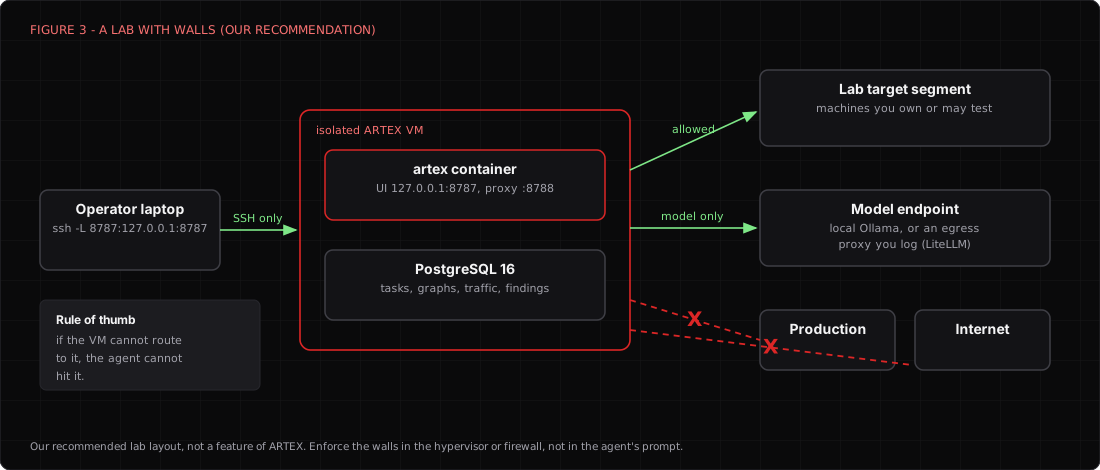
Here's the lab shape we recommend. ARTEX runs on its own VM. That VM sits on a segment that can reach your lab targets and nothing else, plus one controlled path to the model, either a local Ollama server or an egress proxy to a hosted API. The web UI stays on loopback and you reach it through an SSH tunnel. No route to production, no route to the open internet, and no shared credentials with anything you care about.
The fork supports a one-click script, a manual Docker Compose path, prebuilt release binaries, and a source build. We'd use the manual Compose path, because you can see every step.
cp .env.example .env
# edit .env: set a real POSTGRES_PASSWORD, leave ARTEX_BIND_ADDR=127.0.0.1
docker compose up -d --build
docker compose ps
The build compiles the frontend and the Go binary inside a multi-stage Dockerfile, then lays down a Python base image with nmap, curl, whois, netcat, the DNS utilities, nuclei, httpx, subfinder, katana, ffuf, dalfox, sqlmap, bbot, and Playwright with Chromium. It will most likely take a while and a few gigabytes of disk. The compose file starts PostgreSQL 16 with a health check, then the artex service, which publishes the UI on 127.0.0.1:8787 and the recording proxy on 127.0.0.1:8788. It bind-mounts ./data, ./keys (the JWT signing key), and ./skills, so you can edit a skill on the host without rebuilding.
First login is claimed with a one-time setup token the backend prints to its log.
docker compose logs artex | grep "Setup token"
# from your laptop
ssh -L 8787:127.0.0.1:8787 you@artex-lab-vm
# then browse to http://localhost:8787/setup
Set a long admin password there. If you ever expose the UI beyond loopback, the README documents ARTEX_BIND_ADDR=0.0.0.0 and a reverse proxy example. Login is rate limited to 10 attempts per minute per client IP. Behind a proxy every request looks like the proxy, so one bad actor can lock everyone out for up to 15 minutes unless you set ARTEX_TRUSTED_PROXIES to the proxy's address. We'd skip all of that and keep the SSH tunnel. An offensive platform with a public login page is a gift to the very people you're trying to emulate.
Configuring the model
ARTEX needs a model to do anything. The supported provider types are anthropic, openai, openai-responses, and ollama, set either in the UI's LLM Configuration page or through environment variables in .env.
# hosted API, in .env
ANTHROPIC_API_KEY=...        # or OPENAI_API_KEY=...
ARTEX_LLM_PROVIDER=          # anthropic | openai | openai-responses | ollama
ARTEX_LLM_MODEL=             # the model name your provider expects
ARTEX_LLM_BASE_URL=          # optional, for a gateway or compatible endpoint
ARTEX_LLM_PROXY=             # optional, route model traffic through a proxy you log
If engagement data can't leave the building, use a local model. The README documents adding a local Ollama server as a keyless provider in the UI, with the format set to Ollama and a default base URL of http://127.0.0.1:11434/v1. There's a catch that will eat your afternoon. Inside the container, 127.0.0.1 is the container, not the host. On Docker Desktop, point the base URL at http://host.docker.internal:11434/v1. On Linux, add extra_hosts: ["host.docker.internal:host-gateway"] to the artex service and start Ollama with OLLAMA_HOST=0.0.0.0, then firewall port 11434 so only the ARTEX VM can reach it. If you're curious what it takes to run serious models locally, I wrote up a 512 GB local AI box and the data control argument for open weights earlier this year.
Model choice matters more than anything else you configure. I'd treat it the way you'd treat hiring. In most cases a small local model will happily run nmap. It will also misread the output, chase a dead end for forty minutes, and report a finding that isn't there with the confidence of a junior consultant on their first engagement. Bigger models plan better and cost more. Start with the strongest model you're allowed to send this data to, measure, and only then try to save money.
Two other settings worth touching early are the worker count and the retester. Three workers per task is the default. More workers means more parallel tool runs and a faster, noisier, more expensive task. The retester is a preconfigured agent you can edit in Agent management, with its own prompt, model, run budget, and tool list. Give it a budget, because an agent without one will spend yours.
Running a task
The UI is organized around tasks. You define a goal and scope, and the goals agent turns that into structured targets. If you already run ScopeSentry, the Asset Sync page can import domains, subdomains, IPs, ports, sites, and endpoints by project or task, so the agents start from known assets rather than rediscovering them. The documentation for the task form itself is thin, so expect to learn some of it by clicking around. The README does mention a demo mode that only generates clearly labeled simulated records and never contacts real targets, which is a decent way to learn the UI before anything touches a network.
Once a task is running, there's a lot to watch. The dashboard shows token consumption and an activity stream. Inside a task you get the sessions, every tool call, and the exploration graph growing as the planner branches. The Findings page lists what the agents claim to have proven, the coverage map shows tested and untested assets, and the Traffic page holds every request and response that went through the recording proxy. If you have approvals turned on for risky actions, they queue on the Interception Approvals page with the full call details.
For authenticated testing, the fork ships a browser extension in extension/. You load it unpacked in a Chromium-based browser, give it your ARTEX URL and token, and browse the target normally, logging in through whatever CAPTCHA or second factor the app requires. It ships the captured requests and responses to ARTEX's traffic store (text bodies only, truncated at 256 KiB, in batches of up to 50), where the agents can search them and bind them to findings. Remember what that means, though. Your ARTEX database now holds live session material for the target. Treat it like a credential store, because it is one.
When a client says they've fixed something, the retest flow is genuinely nice. Click Retest on a finding, add the fixed version or test conditions, and the retester runs an independent session and lands on one of three conclusions, "Still reproducible," "Fixed," or "Cannot confirm," with the evidence attached. Only a completed "Fixed" changes the finding's status automatically. One gap to know about is that retest history isn't included in report exports or task archive packages yet, so pull the evidence yourself if the retest matters to a client.
Where it falls down
Every agentic tool demo looks like magic. Then you run it on something real. Here's what we'd want a team to know before they trust ARTEX with anything.
The model is the ceiling. ARTEX is orchestration. It can't make a weak model reason well, and in security work a confident wrong answer is worse than no answer. Every finding needs a human to reproduce it from the recorded traffic before it goes in a report. The traffic recording makes that easier, which is most likely why it's there.
Cost scales with curiosity. Each planner wake-up is a fresh session that re-reads the situation, and every worker burns tokens interpreting tool output. On a hosted API, a broad scope with extra workers could easily run up a real bill in an afternoon (we have not measured a typical task, and it will vary a lot by model). Set budgets on the agents, set spend limits at the provider, and watch the dashboard's token counter like it owes you money.
Scope enforcement is something you should verify, not assume. The goals agent extracts scope, the asset graph keeps a task scope table, and the fork's design notes list scope and authorization checks among the surfaces that must never be edited automatically. What we couldn't find in the documentation is a description of hard, network-level enforcement. My working assumption is that scope lives mostly in the software's logic and the model's instructions. That's why the lab design above puts the real boundary in the network. If the VM can't route to it, the agent can't hit it, no matter what it decides.
The target can talk back. Agents read whatever the target returns. Page content, error messages, and API responses all flow into model context. The design notes mention prompt-injection defenses, and I haven't independently validated how well they hold. A hostile or simply weird target can steer an agent somewhere you didn't intend, which is one more reason the network boundary matters and the approval gate should stay on for anything destructive.
The fork is a moving target. The original is closed, the forks are diverging, and dependencies install from moving branches. Upgrades swap the program but re-run the database schema on start, so the docs suggest backing up ./data and the database first (scripts/backup.sh --with-data does both), and they warn that an update interrupts running tasks. Pin, test, then upgrade on purpose.
Your ARTEX box becomes the most interesting server in the building. It holds model API keys, the private key of an intercepting certificate authority, captured authenticated sessions, a map of every weakness it found, and the evidence for each one. If an attacker owns your ARTEX instance, they don't need to run their own recon. Harden it like a domain controller, and wipe task data you don't need to keep. If you want a reminder of what happens to stolen AI API keys, it isn't pretty.
How it can actually help a team
With all of that said, I tend to believe ARTEX and tools like it are useful in the right hands, and pretending otherwise just leaves defenders less prepared.
The best use we see is purple teaming. Point ARTEX at a lab copy of your environment and you get realistic, machine-speed attacker behavior on demand, with a complete record of every request it made. Your detection engineers can line up the recorded traffic against what your sensors actually saw and find out exactly which steps were invisible. It's most likely a better detection test than a static replay, because the agent adapts to what it finds, the same way the bad guys' agents will.
The retester is the second-best use. Fix verification is tedious, it gets skipped, and things that were "fixed" quietly come back. An agent that re-runs the proof against each finding after a patch, records evidence, and flags "Still reproducible" is real value for a team buried in remediation tickets.
The coverage map answers the question managers ask and testers hate, "what did we not test?" Breadth on a large external surface is where agents shine and humans get bored, so let the agents do the first wide pass inside an authorized scope, and spend your senior people on the chains and logic flaws that models still miss. And for junior testers, the approval gate turns the agent into a teaching tool. Every proposed action shows up with its reasoning before it runs, which is a pretty good way to learn why an experienced tester would or wouldn't do something.
Detecting and slowing down AI-driven attacks
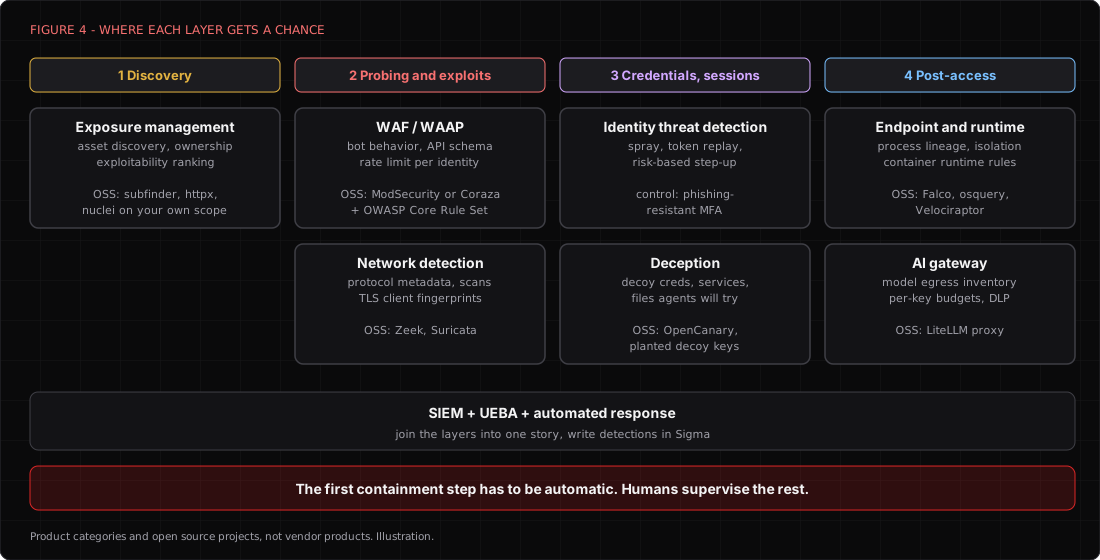
Now the half that matters for most readers. An ARTEX-style attack isn't new tradecraft. It's known tradecraft executed without breaks, in parallel, with fast adaptation. That changes what to look for and how fast you need to respond, but it doesn't change the fundamentals. I'll describe the product categories and the capabilities that matter rather than vendors, and name open source projects where you can build the capability yourself.
Shrink what the agent can find
The agent's first move is discovery, and it's fast and thorough. Exposure management products (sometimes sold as external attack surface management) continuously discover your internet-facing assets, fingerprint what's running, rank exposures by exploitability, and tie each one to an owner. The feature that matters most is the last one. A finding with no owner is a finding nobody fixes. You can build a basic version with the same open source tools the agent uses. Run subfinder, httpx, and nuclei against your own scope on a schedule and diff the results. If ARTEX can find it in an afternoon, you should have found it last week.
Make the web tier notice automation
Web application firewalls and their API-focused cousins (WAAP, in the industry's acronym soup) are the first layer that sees the agent's probing. The features that matter here are behavioral bot detection that looks at request cadence and sequence rather than just the User-Agent, rate limits tied to a session or identity rather than an IP, API schema enforcement that rejects requests the spec doesn't allow, and virtual patching to cover the gap between disclosure and fix. The open source route is ModSecurity or Coraza with the OWASP Core Rule Set. Start at paranoia level 1 and raise it on the paths agents love, like login, search, and anything that takes an ID parameter.
Watch the wire
Network detection and response products give you protocol metadata for everything, east-west visibility inside the network, scan and sweep detection, TLS client fingerprinting, and analytics for bursts and beacons. Zeek and Suricata are the open source pair.
Start with the cheap layer. ARTEX's toolbox is made of ordinary tools, and several announce themselves by default. These Suricata rules catch the default User-Agents for the nmap scripting engine, sqlmap, and ffuf.
alert http any any -> $HOME_NET any (msg:"LOCAL Nmap NSE default User-Agent"; flow:established,to_server; http.user_agent; content:"Nmap Scripting Engine"; nocase; classtype:attempted-recon; sid:9100001; rev:1;)
alert http any any -> $HOME_NET any (msg:"LOCAL sqlmap default User-Agent"; flow:established,to_server; http.user_agent; content:"sqlmap/"; nocase; classtype:web-application-attack; sid:9100002; rev:1;)
alert http any any -> $HOME_NET any (msg:"LOCAL ffuf default User-Agent"; flow:established,to_server; http.user_agent; content:"Fuzz Faster U Fool"; nocase; classtype:attempted-recon; sid:9100003; rev:1;)
Don't stop there. An agent can be told to change its User-Agent in one sentence, and a careful operator will do exactly that. The better signal is behavior. Zeek's http.log makes the shape easy to see.
# who generated the most 404s (forced browsing, fuzzing)
zeek-cut id.orig_h status_code < http.log | awk '$2==404' | sort | uniq -c | sort -rn | head
# how many distinct User-Agents each client used (rotation is a tell too)
zeek-cut id.orig_h user_agent < http.log | sort -u | cut -f1 | uniq -c | sort -rn | head
My gut says the most durable tell for agent-driven activity is rhythm. A human tester runs a tool, reads, thinks, and runs another tool, with long and irregular gaps. A script hammers continuously. An agent does something in between. It fires a burst of related requests, goes quiet for roughly as long as a model takes to read the output and decide, then fires another burst that's clearly informed by the last response. That's an inference from how the engine works, not a measured signature, so validate it in your own lab (which, conveniently, is the purple team use above).
Own the endpoint and the runtime
If the agent gets code execution, or if someone runs agent tooling from inside your network, endpoint detection and response and cloud workload runtime security are where you see it. The capabilities that matter are process lineage, command-line capture, container-aware runtime rules, and fast host isolation. Falco covers container runtime, osquery gives you SQL over host state, and Velociraptor handles fleet-wide hunting.
A Falco rule for the toolbox ARTEX bakes into its image looks like this. Interpreted tools can appear under the interpreter's name, so match on the command line as well.
- list: agent_toolbox_bins
  items: [nmap, nuclei, httpx, subfinder, katana, ffuf, dalfox, sqlmap, bbot]

- rule: Offensive toolbox binary run in container
  desc: A recon or exploitation tool common in AI pentest frameworks ran inside a container
  condition: >
    spawned_process and container and
    (proc.name in (agent_toolbox_bins) or proc.cmdline contains "sqlmap" or proc.cmdline contains "bbot")
  output: "Offensive tool in container (cmd=%proc.cmdline user=%user.name container=%container.name image=%container.image.repository)"
  priority: WARNING
  tags: [recon, ai_agent]
And these osquery queries find an ARTEX instance that somebody stood up where it shouldn't be, using the default ports and the image name the fork's compose file builds.
SELECT pid, address, port FROM listening_ports WHERE port IN (8787, 8788);
SELECT name, image, state FROM docker_containers WHERE image LIKE '%artex%';
Correlate and respond at machine speed
A SIEM with user and entity behavior analytics is where the layers meet. The point isn't to collect more logs, it's to join them, because a burst of 404s at the WAF, a new TLS fingerprint at the sensor, and a login from the same source three minutes later are one story. Write the detections in Sigma so they move between platforms. Here's one for something agents need and most servers don't, a hosted model API. The domain list is yours to fill, and the filter exempts your sanctioned AI gateway.
title: Hosted Model API Lookup From a Server Segment
id: 6f1b8a0e-2c7d-4f3a-9b1e-5d2c8e7a4b10
status: experimental
description: DNS lookups for hosted model APIs from hosts with no sanctioned reason to call them
logsource:
  category: dns
detection:
  selection:
    query|endswith:
      - '<model-api-domain-1>'
      - '<model-api-domain-2>'
  filter_gateway:
    src_ip|cidr: '10.20.30.0/24'   # your AI gateway subnet
  condition: selection and not filter_gateway
falsepositives:
  - Developer tooling and sanctioned AI features
level: medium
The response side matters as much as detection. When the adversary's loop runs in minutes, a ticket that waits for the morning shift is a souvenir. Security orchestration and automated response, whether a product or scripts in your SIEM, should make the first containment step automatic for high-confidence patterns. Block the source, step up authentication, isolate the host. Then let a human decide what comes next.
Protect identity, because the agent will try it
Agents are excellent at the unglamorous identity attacks, like password spraying at a careful pace, credential stuffing from a breach list, and replaying any token they find in a response. Identity threat detection and response products watch for exactly that, with spray detection across many accounts, impossible travel and new-device scoring, token replay and session anomaly detection, and risk-based step-up. The control that makes most of it moot is phishing-resistant MFA. An agent that finds a valid password and then hits a hardware-backed prompt has found a dead end.
Lie to the agent
Deception products plant decoy credentials, services, and files and alert the moment anything touches them. It appears they work unusually well against agents, because an agent reads everything it finds and dutifully tries every credential it sees (it's the most diligent intern you'll ever have, and it never asks why the password is in a text file). OpenCanary gives you decoy services, and a fake .env with a decoy API key on a web server costs nothing to plant. Any use of that key is a high-fidelity alert, because no legitimate process should ever touch it.
{
  "device.node_id": "web-decoy-01",
  "http.enabled": true,
  "http.port": 80,
  "ssh.enabled": true,
  "ssh.port": 22
}
Govern your own AI use
The last category faces inward. AI security gateways and the AI controls in secure web gateway platforms inventory which AI apps and APIs your people and servers use, enforce allowlists, apply data loss prevention to prompts and responses, and log usage per identity. That protects you two ways. You notice when a server suddenly starts calling a model API, and your own keys don't become someone else's free inference. The open source option is LiteLLM running as a proxy in front of every model your teams use, with a virtual key per team or tool, a spend cap on each key, and logs you actually read. Point your own ARTEX lab at it with ARTEX_LLM_BASE_URL, and you get the budget control the tool lacks.
# litellm config.yaml, a single gateway in front of a local model
model_list:
  - model_name: lab-agent
    litellm_params:
      model: ollama/<your-model>
      api_base: http://127.0.0.1:11434
general_settings:
  master_key: <generate-a-long-random-key>
Fight agents with an agent, on a short leash
You can turn the same pattern around. A defensive triage agent can run on a local model through Ollama, with read-only tools over your Zeek logs, Suricata's eve.json, and your SIEM's search API, exposed through an MCP server you write. Its job is narrow. Group alerts by source, score the burst-pause-burst rhythm described above, pull the matching web and identity events, and draft a containment recommendation with the evidence attached. A human approves, and your automation executes. Give it no write access, no shell, and no ability to change its own instructions. The same principle that makes ARTEX's approval gate valuable applies here. Autonomy is fine for reading. Authority should stay with people.
What actually changed
So what does ARTEX change? Not the attacks. Every technique it runs is one you've seen in a report written by a tired human. What changed is the cost of patience. Reading output, picking the next step, and trying again at 3 a.m. used to require a person, and now it requires a model and a budget.
That moves the problem for defenders from "can they do it" to "how fast, and how many at once." Detection that depends on a human noticing within a day was built for the old pace. The control that has to become architectural rather than advisory is containment speed, with automated first response for the patterns you trust and humans supervising rather than typing every step.
And for teams that use these tools, the question is the same one it has always been, just with less friction. Who authorized this agent, what can it touch, and who's accountable when it decides something on its own? If your answer is "the model said it was in scope," you've built a very expensive way to explain yourself to someone with a badge (and the agent won't be the one in the interview).

Founder · Dr. Chaos
Aamir Lakhani is a leading senior security strategist responsible for providing IT security solutions to major enterprises and government organizations. He creates technical security strategies and leads security implementation projects for…