Half a Terabyte on Your Desk: The 512 GB M5 Ultra Mac Studio for Local AI and Security

Apple's pitch for the new Mac Studio is that you can "run massive models entirely on device with complete privacy." It's a catchy line, and for once the hardware behind it seems genuinely interesting. As of October 28, you can finally order the M5 Ultra Mac Studio with 512 GB of unified memory, the configuration Apple promised back in August and then made everybody wait for.
But a catchy line is not a deployment plan, and the questions people keep asking in our circles are probably less about benchmarks and more practical. What can you actually load on this thing, what software do you run it with, does Kimi K3 fit, what about the uncensored models, should you stack four of them, and is a pile of NVIDIA DGX Sparks the smarter buy? So we went through Apple's own numbers, the model cards, and the clustering research, and tried to answer those questions with a security person's bias.
We had two goals for this piece, and they pull against each other a little. We wanted to get excited about a box that puts half a terabyte of fast memory under a desk, because for local AI that is most likely a big deal. We also wanted to be honest about what it costs, what still doesn't fit, and what you quietly take on when you become your own AI provider. One more thing up front. Nobody we know has a 512 GB unit yet, because Apple's own store page says it ships in seven to eight weeks, so everything below comes from published specs, vendor benchmarks, and arithmetic, and I'll mark which is which.
What Apple actually shipped today
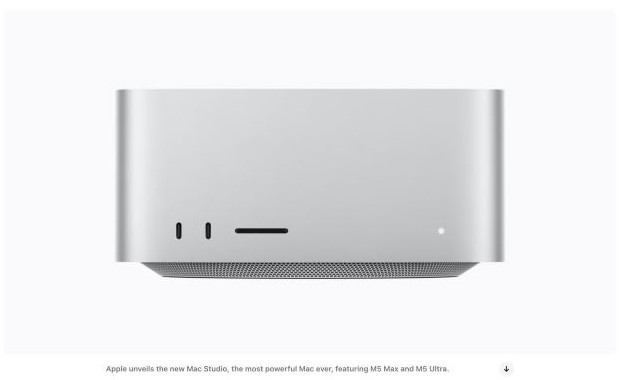
The headline numbers come from Apple's August 25 announcement. The M5 Ultra has up to a 36 core CPU and an 80 core GPU, it's the first Ultra chip with a Neural Accelerator in every GPU core, it tops out at 512 GB of unified memory, and it moves that memory at 1.2 TB per second, which Apple says is 50 percent more than the last generation. Macworld reports that it's a four die design this time rather than two Max chips glued together. There are up to six Thunderbolt 5 ports at 120 Gb per second, and Apple says Thunderbolt 5 with RDMA lets you cluster several Studios into one shared memory pool.
The 512 GB model needs the top chip and starts at $22,299 with a 1 TB drive, according to Appleosophy, and the 16 TB version climbs to $29,799, which makes it the most expensive Mac Apple sells right now.
Of all those numbers, the memory capacity and the memory bandwidth are probably the two that matter most for running language models, and it helps to know why. When a model writes an answer, every new token requires reading the active weights out of memory, so how fast it types is, in most cases, limited by bandwidth. When it reads your prompt first (the "prefill"), the work is closer to raw math, which is where Apple's new Neural Accelerators come in. Apple claims up to 4x faster prompt processing in LM Studio compared with the M3 Ultra, and I tend to believe the direction of that claim even if I would not quote the exact multiplier to anyone, because it's a vendor test from July with Apple's choice of model and prompt.
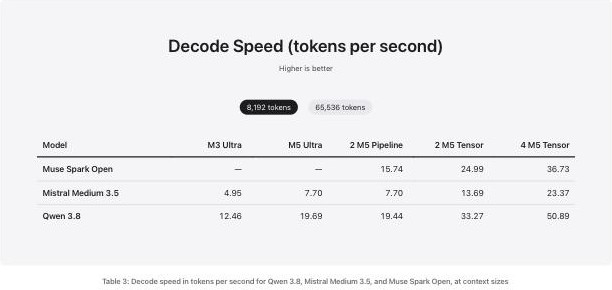
The more useful numbers, as far as we could tell, are in a post Apple's machine learning team published on October 15, Local and Distributed Large LLM Inference with MLX and RDMA on Mac Studio. It is still Apple measuring Apple, but it names the models, the precision, and the context sizes, which is more than most launch materials do. At an 8,192 token context, a single M5 Ultra generated about 19.7 tokens per second on Qwen 3.8 (a 27B dense model) versus 12.5 on the M3 Ultra, and 7.7 versus 4.95 on Mistral Medium 3.5, a 128B dense model at FP8.
That works out to roughly 1.6x faster at typing and, per the same post, up to 4.6x faster to the first token. That appears to be a solid generational jump. But notice that the jump in typing speed tracks the bandwidth increase pretty closely, which is what the physics suggests should happen.
What actually fits in 512 GB
Here is the mental model we use. A model's size in memory is roughly its parameter count times the bits stored per parameter, divided by eight, plus room for the conversation itself (the KV cache, which grows with context length), plus whatever macOS needs to stay alive. At 16 bits a parameter costs two bytes, at 8 bits one byte, and at 4 bits half a byte. Most people running local models use 4 bit or 8 bit "quantized" builds, which trade a little quality for a lot of memory, and in most cases the trade is a good one down to about 4 bits. Below that, quality likely falls off faster than the marketing suggests.
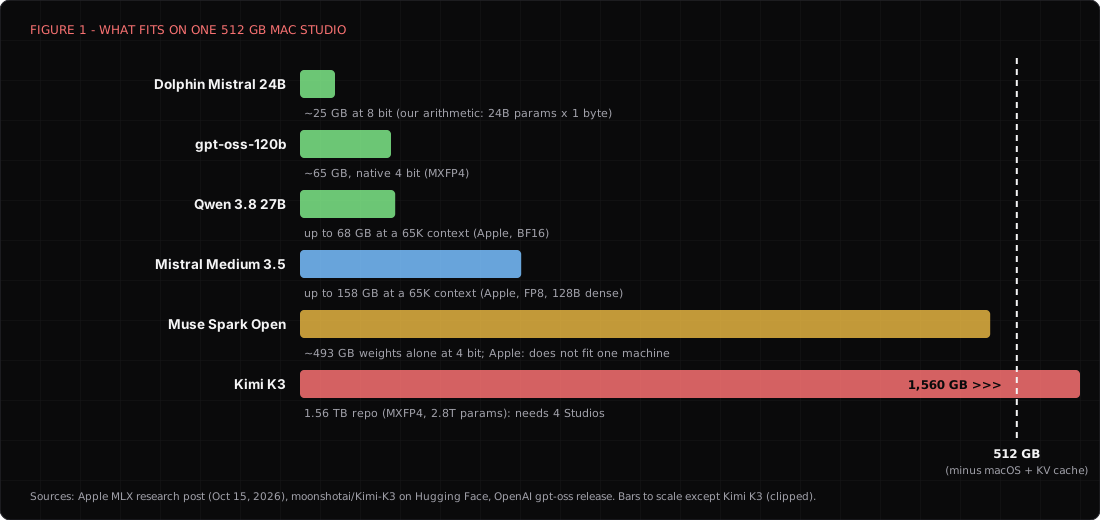
So what goes on it? The easy, fast, everyday choice is OpenAI's open weight gpt-oss-120b, which ships in a 4 bit format at roughly 65 GB and only wakes up about 5 billion parameters per token, so it will most likely feel quick on this much bandwidth. Qwen 3.8 at 27B is the small, sharp model Apple used in its tests, and it used up to 68 GB at a 65K context. Mistral Medium 3.5 is the big dense option at 128B, and Apple measured it at up to 158 GB with a long context. You could keep all three of those loaded at the same time and still have room left over, which is a strange sentence to write about a desktop computer.
The giant mixture of experts models are where it gets interesting and where you should start squinting. Apple tested Meta's 816B Muse Spark Open and says it needs about 493 GB even at 4 bit, and Apple's own conclusion is that it does not fit on one machine. Some third party guides claim you can squeeze it in after raising macOS's GPU memory limit, and it's possible on paper, but it probably leaves almost nothing for context, and I would not plan a workflow around it. Several of the very large Chinese open models reportedly fit only at 2 or 3 bits. That might work, and it might also make a frontier model behave like a tired intern, so test it on your own tasks before you trust it.
My gut says the sweet spot for a single 512 GB Studio is not "the biggest model that technically loads." It's two or three very good models in the 100B to 250B range sitting in memory together, with plenty of room for long contexts. For security work that means you could keep a fast general model, a coding model, and an uncensored model resident at the same time, and switch between them without waiting for a reload. That is probably the real upgrade over a 128 GB machine. But it's an upgrade in convenience and context, not in model class.
Kimi K3, the model that doesn't fit
Kimi K3 is the one everybody asks about, and the honest answer is short. It does not fit on one Mac Studio, not even close. Moonshot's model card describes 2.8 trillion total parameters with 104 billion active per token, 896 experts with 16 picked per token plus 2 shared ones, a context window of roughly a million tokens, and weights trained to live natively in MXFP4, a 4 bit format. The repository itself is listed at 1.56 TB across 96 files. That is about three times the memory of the biggest Mac Studio you can buy today, before you add a single token of context.
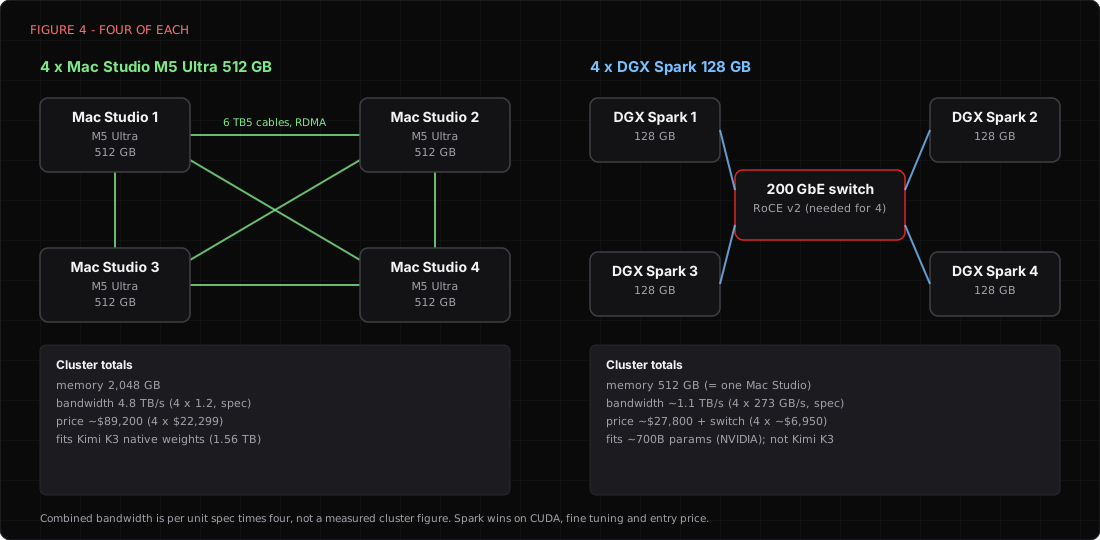
The arithmetic for a cluster goes like this. Three 512 GB Studios give you 1,536 GB, which is a little less than the weights alone, so three is out. Four Studios give you 2,048 GB, which leaves room for macOS on each node and a reasonable context, so four is most likely the realistic minimum for the native weights. Four of the 512 GB models cost about $89,000 before cables and tax. (For that money you could also buy a very nice car, which would not run Kimi K3 either.)
How fast would it run? Nobody has published a reproducible M5 Ultra number for K3 that I could verify. Alex Cheema of exo predicted 30 or more tokens per second on four 512 GB Studios using tensor parallelism over RDMA, and he labeled that a forecast. A secondhand write up of a four Studio demo reports about 238 tokens per second reading prompts and about 14.7 tokens per second writing, on a roughly 817 GB quantized build, but it doesn't give the chip, the context length, or the method.
Our own back of the envelope says each token needs to read about 55 GB of active weights at 4 bit, so a single 1.2 TB per second machine would top out somewhere near 20 tokens per second even if it could hold the model, and a well tuned four node cluster would likely land somewhere above that. I'd plan for teens to low twenties and be pleasantly surprised by anything better.
There are two more catches. First, Moonshot recommends vLLM, SGLang, and TokenSpeed for inference, all of which are built around NVIDIA style GPUs, so running K3 on Macs depends on community MLX and exo support rather than the vendor's blessed path. Second, you will see "REAP" or pruned versions of K3 advertised at around 350 GB, small enough for one Studio. Those builds remove most of the experts. That seems to me like a different model wearing K3's name tag, and nobody I trust has shown that it keeps the quality that made K3 worth wanting.
Moonshot also announced K3.1 Pro on October 23 at around 3 trillion parameters, and I have not confirmed whether its weights are downloadable yet. If they are, the cluster math only gets worse. We covered what K3 is good and bad at for red team work in our earlier Kimi K3 Swarm review.
The software you actually run
The nice thing about Apple silicon in late 2026 is that you probably no longer need to be a compiler person to use it. The stack splits into engines that load the model, servers that expose it, and the apps that talk to it, and most of the pieces speak the same OpenAI style API, so in most cases you can swap them freely.
- LM Studio is the friendliest start. It runs both MLX and GGUF builds, has a model browser, and can serve an OpenAI compatible endpoint. It's also the app Apple used for its prompt processing claims.
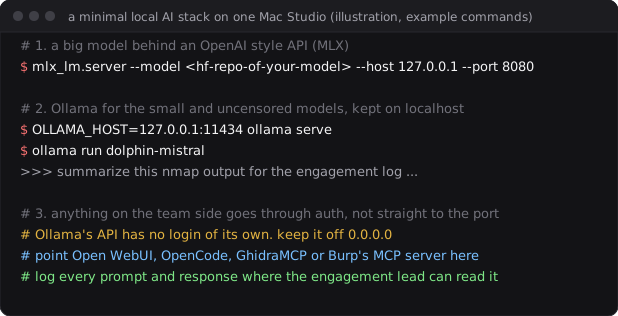
- Ollama is the command line favorite. One command pulls and runs a model, and it exposes a local API on port 11434 that a lot of other tools expect.
- MLX and mlx-lm are Apple's own framework and model runner.
mlx_lm.servergives you an API, andmlx.launchwith thejacclbackend is what Apple used to spread a model across machines over RDMA. - llama.cpp is the engine underneath a lot of the above, and it's still the most flexible way to run oddly quantized GGUF files.
- exo turns several Macs into one cluster with automatic model splitting. Its team says it worked with Apple on the RDMA support and that it's featured on Apple's new product pages.
- Open WebUI gives the team a private chat interface in a browser, pointed at whatever local server you run.
For security work, the interesting part is what you plug into those servers. Apple's own post shows the coding agent OpenCode pointed at a local MLX server on port 8080, which means a full agentic coding loop with no source code leaving the building. GhidraMCP lets a model drive Ghidra through the Model Context Protocol for reverse engineering, and people have documented running it with local models in LM Studio. PortSwigger publishes an MCP server for Burp Suite as well.
Malware triage, log summarization during an incident, threat intel enrichment, and code review of a client's application are all jobs where the data is the sensitive part, and in most cases the model doesn't need to be a frontier model to be useful.
Uncensored and abliterated models
This is the part of local AI that hosted services will never offer you, and it's likely the reason a lot of red teams want local hardware in the first place. There are two different ways people remove a model's tendency to refuse, and they seem to get mixed up constantly.
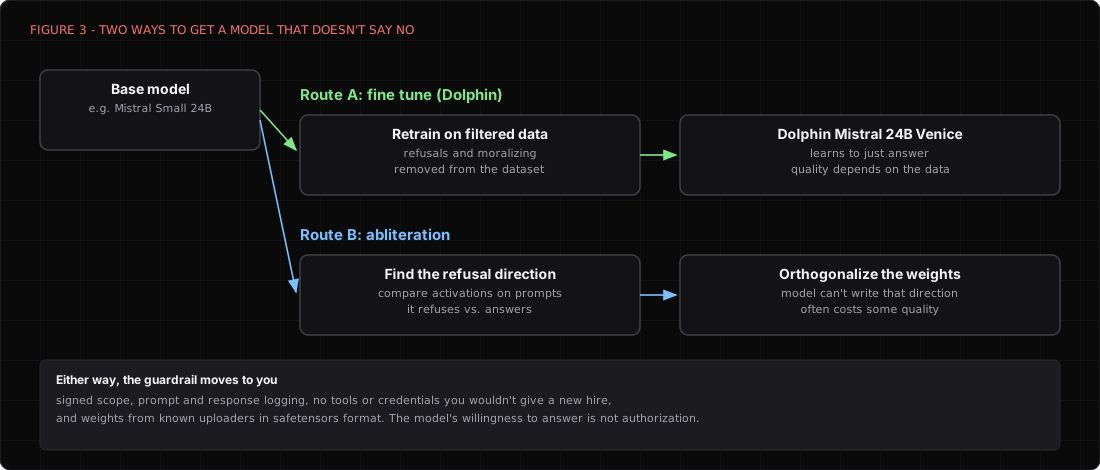
The first is fine tuning on filtered data, which is how the Dolphin family works. Eric Hartford and the Cognitive Computations group retrain a base model on instruction data with the refusals and the moralizing stripped out, so the model learns to just answer. The classic is Dolphin 2.8 on Mistral 7B, the dolphin-mistral tag on Ollama. The newer one most people mean now is Dolphin Mistral 24B Venice Edition, built with Venice.ai on Mistral Small 24B and billed as the most uncensored Mistral 24B around. At 24B it's tiny for this machine, about 25 GB at 8 bit by our arithmetic, so it probably costs you almost nothing to keep it loaded next to the big models.
The second is abliteration, which is a sneakier trick. Research from 2024 suggests that refusal in many chat models is controlled by a single direction inside the model's internal activations. You feed it a batch of prompts it would refuse and a batch it wouldn't, find the direction that separates them, and then edit the weights so the model can no longer write along that direction. Maxime Labonne's walkthrough on Hugging Face explains it well, including the catch that abliteration measurably hurt his test model's benchmark scores until he did extra training to repair it. Community uploaders publish abliterated versions of almost every popular open model within days of release.
Why would a security team want either one? Because a model that argues with you about whether your signed scope is real probably wastes an afternoon. Ask a hosted assistant to explain a detection for Kerberoasting and in most cases it helps. Ask it to write the actual lab script and you might get a lecture. Dolphin just answers, and none of it leaves your machine. We went deeper on this, including the risks, in our earlier piece on open weights and Dolphin.
WARNING
An uncensored model removes the vendor's guardrails, not the law. Use it only inside a written, signed scope, log every prompt and response somewhere the engagement lead can read it, and never give it tools or credentials you would not hand a new hire told to run everything without asking. Its willingness to answer is not your authorization.
There is also a supply chain question nobody likes to ask. An abliterated model is a set of weights edited by somebody you have probably never met, and you're about to give it your client's data and maybe a shell. Researchers have shown that models can carry hidden "sleeper" behaviors that survive safety training, so it's possible for a model to behave nicely in testing and badly on a trigger.
I have no evidence that any popular abliterated upload is backdoored. But my working assumption is that weights from an anonymous account deserve the same suspicion as a binary from an anonymous account, so prefer safetensors files, prefer well known uploaders, and keep models with tool access on a short leash.
Clustering Mac Studios
The feature that turned Mac Studios into a cluster story is RDMA over Thunderbolt 5, which arrived with macOS 26.2 last December. RDMA (remote direct memory access) lets one machine read another machine's memory without the usual network stack in the way, which cuts the latency of each hop from hundreds of microseconds to tens.
That matters because of the two ways you can split a model. Pipeline parallelism gives each machine a slice of the layers, which is simple and helps with models too big for one box, but it does not make the model type any faster. Tensor parallelism splits every layer across every machine, which does speed up typing, but it needs many tiny exchanges per token, and that only works on a very low latency link.
Apple's numbers appear to show the difference clearly. On Qwen 3.8, two M5 Ultras in pipeline mode wrote at about 19.4 tokens per second, basically the same as one machine, while two in tensor mode hit 33.3 and four hit 50.9. Mistral Medium 3.5 went from 7.7 on one machine to 23.4 on four. The 816B Muse Spark Open, which doesn't fit on one Studio at all, ran at 36.7 tokens per second on four. Apple's setup used two Thunderbolt cables per link for two machines and a full mesh of cables for four. That's a real result for a desktop cluster. But it's also Apple's best case, measured by Apple, with 128 generated tokens per test.
A few practical cautions from the people who have done this with the previous generation. Jeff Geerling's four Studio test ran Kimi K2 Thinking successfully but described the software as early, and Apple's own post calls one of the speed settings it used experimental. Thunderbolt 5 cables are short, a full mesh of four machines eats six cables and most of your ports, and every node runs a full copy of macOS that you have to patch. Each of these is probably solvable. But a cluster is a small data center with nicer industrial design, and it needs the same care.
Versus a stack of NVIDIA DGX Sparks
The DGX Spark is the obvious comparison because it's the other "AI supercomputer on your desk," and it seems to be a very different bet. Each Spark has a GB10 Grace Blackwell chip, 128 GB of unified memory at 273 GB per second, up to one petaflop of FP4 compute with sparsity, and a ConnectX-7 network card with 200 Gb Ethernet, according to NVIDIA. NVIDIA supports clustering up to four units, with two or three connected directly and four needing a RoCE capable 200 GbE switch, and it says four units can handle models up to about 700 billion parameters.
A cheaper 64 GB version from partners like ASUS, Dell, and MSI went on sale October 23 at around $4,999, and NVIDIA's own 128 GB unit has been reported at $6,950 on its marketplace, up from $3,999 at launch, after memory shortages pushed prices up twice.
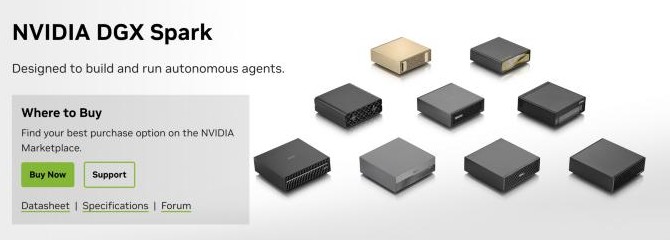
| Mac Studio M5 Ultra 512 GB | DGX Spark 128 GB | |
|---|---|---|
| Memory per unit | 512 GB | 128 GB |
| Bandwidth per unit | 1.2 TB/s | 273 GB/s |
| Price per unit (Oct 2026) | $22,299 | about $6,950 |
| Price per GB of memory | about $44 | about $54 |
| Biggest supported cluster | 4 shown by Apple, 2 TB | 4 units, 512 GB |
| Link between units | Thunderbolt 5 with RDMA | 200 GbE ConnectX-7 with RoCE |
| Software home turf | MLX, llama.cpp, exo | CUDA, vLLM, SGLang, NIM |
| Operating system | macOS | DGX OS (Ubuntu based) |
The comparison is less close than the marketing on either side wants it to be. A fully loaded four unit Spark cluster has the same 512 GB as one Mac Studio, and its combined bandwidth of roughly 1.1 TB per second is a little below what one M5 Ultra has on its own. So for simply holding a big model and making it type fast, the Mac most likely wins, and it wins by a lot at the top end. Kimi K3 is a good example. Four Studios can hold it and four Sparks cannot.
NVIDIA's own test claims two clustered 64 GB Sparks ran up to 1.7x faster than one 128 GB unit on a 27B Qwen model, which suggests clustering helps, but it is still a vendor number on a small model. One developer also reported on NVIDIA's forum that a direct 200G link negotiated at full speed but moved far less real data, so measure your own link before you trust a spec sheet, whichever logo is on it.
But the Spark is not trying to win that race. It runs the same CUDA stack as the big data center GPUs, so vLLM, SGLang, fine tuning with the usual PyTorch tools, NVFP4, and NVIDIA's NIM containers mostly behave the way they would on a data center GPU. If your team fine tunes models on its own detections or phishing samples, builds agents that will eventually run on NVIDIA hardware in the cloud, or just needs Linux and Docker without fighting macOS, the Spark is probably the more honest development box. It's also the cheaper way in. Two 64 GB units cost about $10,000, which buys a real 128 GB cluster to learn on.
So here's my call, and it's a judgment, not a measurement. If you want to run the biggest open models locally, privately, and fast, for inference, the Mac Studio is the better machine, and the 512 GB model is the first desktop that makes the frontier class practical with a cluster you can fit on a shelf. If you want to train, fine tune, or build for CUDA production, buy Sparks. If you want both, I'd probably buy one Studio and two Sparks before I'd buy four of either.
The security part nobody puts on the spec sheet
Every vendor pitch for local AI leans on privacy, and the privacy is real. A model running on your own box doesn't send client data to a third party, doesn't sit under someone else's retention policy, and can't be switched off by somebody else's trust and safety team in the middle of an engagement. For incident response, malware analysis, and anything regulated, that alone might justify the price. But "local" moves the security work to you, and a few things deserve attention before the box goes on the network.
Ollama's API has no authentication of its own, and by default it listens only on localhost. People will likely change that so the rest of the team can use it, and an AI server on 0.0.0.0 with no login is just an open service that happens to be expensive. Put an authenticating proxy or a private VPN in front of anything shared, and keep the raw model ports off the general network. The same goes for every OpenAI compatible endpoint in the list above.
Treat the Thunderbolt cables in a cluster as trusted wiring, which means the cluster lives somewhere physically locked. And once a model has tools, like Ghidra, Burp, or a shell, prompt injection stops being a theory, because a malicious string in a sample, a log, or a web page can now steer something that acts. We wrote about how that maps into ATT&CK in our piece on the new prompt injection techniques.
Defenders should also take the uncomfortable lesson. Everything in this article is available to attackers on the same terms, including the uncensored models and the clusters. A criminal crew with a pair of Studios can now run a very capable model with no usage policy, no logging, and no account to ban. I don't think that changes how most detections work, because a loader written by a model still has to execute and still talks on the wire like a loader. It probably does change what you should assume about the quality and volume of lures and scripts you'll see. In most cases the safest working assumption is that the other side has the same box you do.
Who should actually buy one
So, is the 512 GB M5 Ultra Mac Studio worth $22,299? For most people, no, and a 128 GB or 256 GB machine will likely run the models they actually use. For a security team that handles data it can't send to anyone, wants frontier class open models without a cloud bill, and has the discipline to run its own little AI provider properly, it's probably the most practical box anyone has shipped. Four of them can run Kimi K3. One of them can run nearly everything else.
What changed today is where the AI provider lives. For years the provider was a company with a policy page, a log retention setting, and a support queue. With this machine, the provider is you, along with the access control, the model provenance, the logging, and the decision about what an uncensored model is allowed to touch. My gut says that's a good trade for the people ready to make it. (It's also the first time in history a Mac's main security risk is that it's too willing to help.)
Further reading
- Apple, Apple introduces new Mac Studio with M5 Max and M5 Ultra (Aug 25, 2026)
- Apple Machine Learning Research, Local and Distributed Large LLM Inference with MLX and RDMA on Mac Studio (Oct 15, 2026)
- Appleosophy, Mac Studio with 512GB of RAM now available (Oct 28, 2026)
- Macworld, Apple announces the M5 Ultra Mac Studio
- Moonshot AI, Kimi K3 model card
- NVIDIA, DGX Spark and the connect multiple Sparks playbook
- StorageReview, DGX Spark 64GB goes on sale October 23
- Jeff Geerling, 1.5 TB of VRAM on Mac Studio, RDMA over Thunderbolt 5
- Arditi et al., Refusal in LLMs is mediated by a single direction (2024), and Maxime Labonne, Uncensor any LLM with abliteration
- Cognitive Computations, Dolphin Mistral 24B Venice Edition
- Earlier on this site, Kimi K3 and K3 Swarm, a red team review and Open weights, Mistral Large 4, and Dolphin

Founder · Dr. Chaos
Aamir Lakhani is a leading senior security strategist responsible for providing IT security solutions to major enterprises and government organizations. He creates technical security strategies and leads security implementation projects for…